Claude connector search: how an MCP gets found
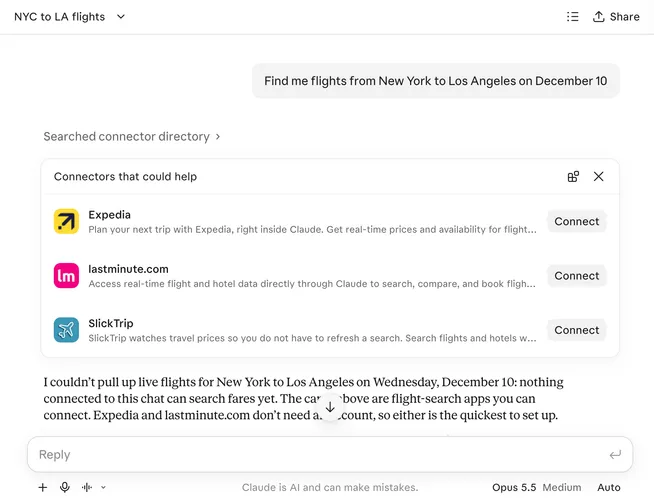
In the previous article on the Claude Marketplace we talked about Claude suggesting connectors when one fits the task. Now we want to dive deeper into Claude connector search through one example: SlickTrip MCP, a flight and hotel price tracker.
The research was inspired by the Reddit post “Claude brought us 24,000+ users in 5 weeks”. SlickTrip’s founder claimed 24,000 new accounts with no ads after the connector went live in Claude’s directory at the end of September: up to 1,500 sign-ups a day while it was trending, and about 250 a day since. The founder credits the listing: “When someone asks Claude about flights or hotels, it recommends us right next to Expedia and Booking.com.” We cannot confirm the sign-up numbers, but we could test how the connector gets found. We sent about 500 prompts (some of them more than once) to real claude.ai chats on Opus 5.5 with web search on, which gave 348 connector registry searches, and compared what came back with SlickTrip’s public directory listing.
Key takeaways
- SlickTrip was returned in 44 of 348 registry searches, and Claude never searched for its name.
It was found through generic travel words such as
flightsandhotels. - The search matches the directory listing: name, one-liner and tool names. A keyword has to appear there as a whole phrase, words together and in order.
- Words found only in SlickTrip’s live MCP tool descriptions did not get it returned.
- Being returned is not being suggested. Claude picks a few connectors from the results for its “Connectors that could help” card.
- Claude searches connectors when a task needs a specific system that holds the user’s data or does the action, and searches the web when the answer is public information.
- Only partner and Anthropic tier connectors came back, never community tier.
How Claude searches for connectors
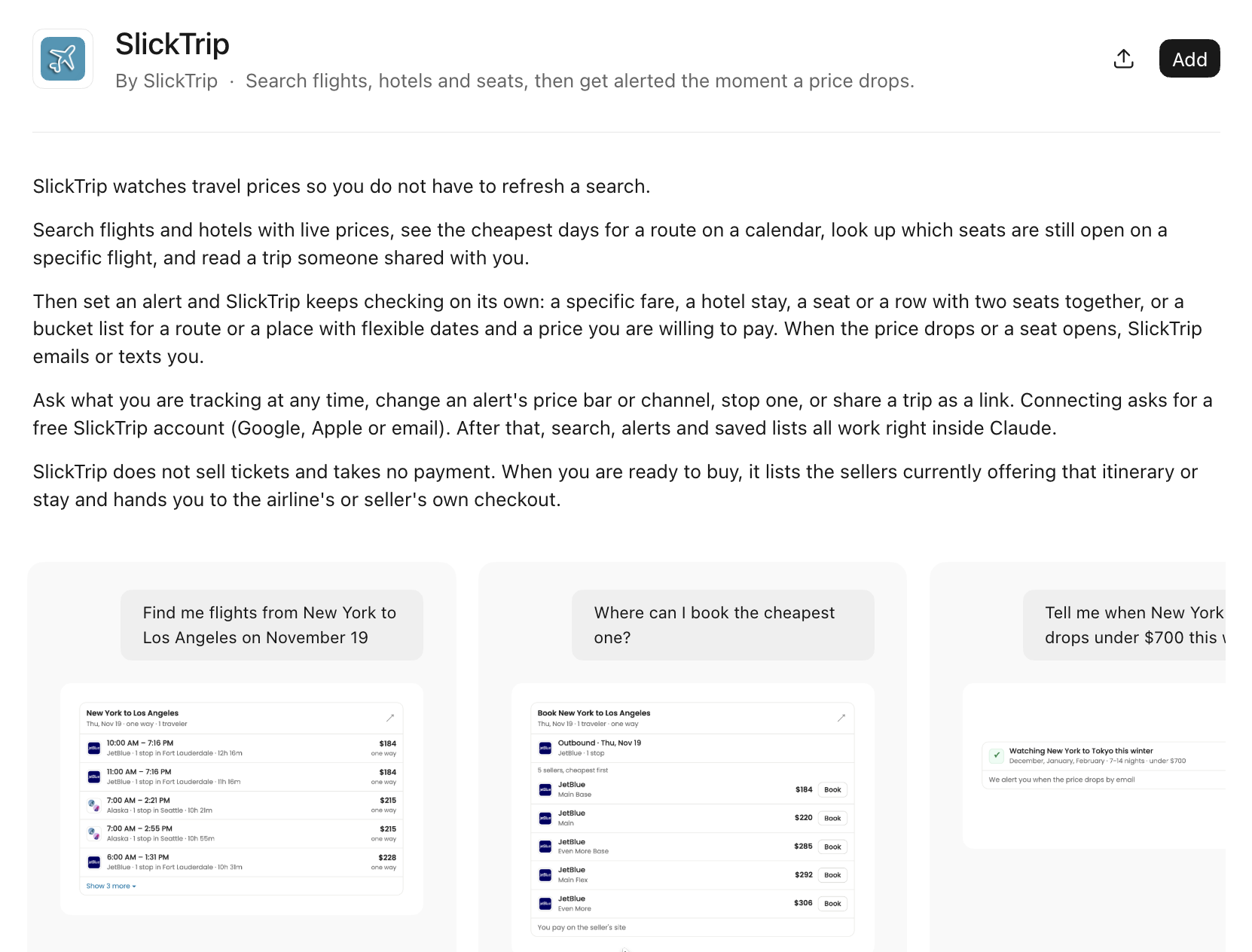
SlickTrip’s one-liner reads: “Search flights, hotels and seats, then get alerted the moment a price
drops.” The listing has 36 tools, including search_flights, search_hotels, price_calendar,
hotel_price_calendar, seat_availability, track_flight, track_hotel, track_seats,
update_flight_tracking, hotel_booking_options, route_airlines and recent_deals.
For each prompt Claude sends the search a handful of keywords. Here are examples from our chats, each with the keyword that matched SlickTrip’s listing:
flights, flight search, travel booking, airfare:flightsis in the one-liner (“Search flights, hotels and seats”).american airlines, flight seat map, airline booking, flights:flightsagain. None of the seat keywords is in the listing as a phrase.vacation rental, airbnb, vrbo, travel booking, hotels:hotelsis in the one-liner.price alerts, price tracker, price drop, camelcamelcamel, keepa, shopping deals:price dropmatches “price drops” in the one-liner.hotel booking, booking.com, expedia, travel:hotel bookingis inside the tool namehotel_booking_options.seat alert, flight seat map, expertflyer, british airways, flight tracking:flight trackingis inside the tool nameupdate_flight_tracking.
Every chat whose keywords included flights returned SlickTrip, 30 of 30. Across all searches,
flights accounted for 31 of its 44 returns and hotels for 5.
Claude never sent slicktrip as a keyword, unlike popular brands such as expedia, kayak and booking.com, which it added to its searches on its own.
SlickTrip ranked between 2 and 10 in the results, with a median of 5 for one-liner matches and 8 for tool name matches. (That is its position in one search’s results, not the usage-based directory rank.) It never ranked first, because nobody searched for its name.
Four parts of a listing that impact the search ranking:
- Name. A brand keyword puts the connector at rank 1 or 2. Names are also matched word by word and fuzzily: a finance connector whose name resembles the word “flights” came back in most of our flight searches.
- One-liner and tool names. The whole keyword must appear as a phrase, words together and in
order. Tool names are split on underscores, so
update_flight_trackingreads as “update flight tracking”. The last word may run on into a plural (price dropmatches “price drops”), but not the reverse. These matches rank 2 to 10. - Description. Phrase matches here count only weakly: 71 of the 3,164 results returned across all our chats.
- Tier. Every result was partner or Anthropic tier. The search never returned a community connector, even when its listing matched the keywords.
How Claude decides which connectors to display
A phrase match does not guarantee a place, since a crowded list of 10 or more results can push a weaker match out. The directory’s public search API splits keywords into words in every field and returns more than Claude’s search does, so treat it as an upper bound.
SlickTrip was in the results in 42 chats, and the same travel connectors came back with it almost every time: Expedia in 38 of those chats, eDreams in 36, lastminute.com in 33, Turkish Airlines in 29, plus a few others. Claude then chose which ones to show on the card:
| Connector | On the card (of 42 chats) |
|---|---|
| Expedia | 30 |
| SlickTrip | 18 |
| lastminute.com | 18 |
| eDreams | 11 |
| Booking.com | 3 |
On 8 of its 18 cards, SlickTrip was the only connector. All 8 were tasks only its tools cover: open seats on a specific flight, fare and price alerts, price drops. “Which seats are still open on AA100 from New York to London on December 3?” ran 3 times, with SlickTrip alone on the card each time.
Hotels were harder. For “Find boutique hotels in Lisbon with free cancellation…” Claude searched
hotel booking, booking.com, expedia, travel. SlickTrip came back at rank 8, but the card showed
Expedia and Booking.com.
The search reads the directory listing, not your live server
The keywords seat alerts and flight seat alert never returned SlickTrip, although “seats” is in
its one-liner and tool names. Neither exact phrase is in the listing. The prompt “What seat alerts
do I have?” got no suggestion at all.
“Seat alerts” does appear in SlickTrip’s live MCP tool descriptions, which its server sends to a connected agent. It still did not retrieve SlickTrip, and that search returned only 8 results, so nothing was crowded out. It is one clean case for SlickTrip, consistent with the other connectors we checked.
The same need in other words worked: “Alert me when an aisle seat opens up on BA 178 from JFK to
Heathrow on February 9.” Claude’s keywords included flight tracking, which is inside the tool name
update_flight_tracking. SlickTrip came back at rank 2 and was the only connector on the card.
Does Claude search connectors or the web?
Claude can search the connector registry, the web, both or neither. Across all chats:
| Outcome | Share of chats |
|---|---|
| Web search only | 35% |
| Connector registry search only | 28% |
| Both | 19% |
| Neither | 18% |
The intent of the prompt decides which:
| Prompt intent | Chats | Connector search | Web search |
|---|---|---|---|
| Concrete travel search (route and dates, a seat on a flight) | 43 | 72% | 49% |
| Flexible travel (“cheapest days to fly”, “deals”, “where can I go”) | 25 | 8% | 92% |
| Alert, watch or track a price or seat | 34 | 32% | 18% |
| Acting on “my” account or data | 74 | 89% | 3% |
| Hire an individual freelancer or gig worker | 183 | 75% | 54% |
| Find an agency, company or firm | 208 | 22% | 78% |
| Reputation of a company or seller | 29 | 10% | 100% |
| Follow-up to a chat that does not exist (“the second hotel”) | 33 | 18% | 6% |
Claude searches connectors when the task needs a specific system that holds the user’s data or
performs the action, and searches the web when the answer is public information. A route on a date
needs a booking tool. A question about the cheapest week or the best deals reads as public research.
That is awkward for SlickTrip: its price_calendar tool answers “cheapest days to fly”, yet that
kind of flexible question went to the web 92% of the time, so the connector was rarely considered.
Alerts are a case of their own. In 13 chats, Claude created or listed its own scheduled task instead of searching for a connector.
Do longer prompts go to the web?
Longer prompts did not reduce connector searches:
| Prompt length | Chats | Connector search | Web search |
|---|---|---|---|
| 0–7 words | 66 | 41% | 36% |
| 8–11 words | 339 | 50% | 58% |
| 12–15 words | 203 | 45% | 54% |
| 16+ words | 98 | 46% | 51% |
How stable is it?
We ran 165 prompts more than once. The connector search came out the same in 84% of them, the web search in 83%. Prompts acting on the user’s own account never changed: 21 of 21 had the same outcome on every repeat.
Check your keywords and tool names with the Online MCP Inspector
The free Online MCP Inspector runs in your browser. Paste your remote MCP server’s URL and it lists your tools, prompts and resources in plain language, with each tool’s title and name. You can also run a tool and test OAuth sign-in. Then read your tools the way the search does:
- Remove the underscores and read each tool name as a phrase:
hotel_booking_optionsbecomes “hotel booking options”. - List the keywords people and Claude use for your category. In travel:
flights,flight search,hotel booking. - Check whether each keyword appears, whole and in order, in a tool name or your one-liner.
- Repeat for a competitor’s public server. Some servers ask you to sign in before they list their tools.
The Inspector shows your live server, while Claude’s search reads your directory listing. When you rename a tool, update the listing too. Our guide to getting listed in the Claude Marketplace covers the portal where you manage it.
Conclusion
SlickTrip gets found without anyone asking for it by name, because the words in its listing match
the words Claude searches with. flights in its one-liner put it in the results of every chat that used
the keyword, and “seat alerts” in its live tool descriptions never did. Compare your own listing
with the keywords your users type.
Open the Online MCP Inspector and read your tool names the way Claude’s connector search does.