Claude Marketplace: a new MCP growth channel
The Claude Marketplace is where Claude users find connectors, and for a team that ships an MCP server it looks a lot like the early App Store: a catalog that lives inside the product people already use every day. A listing there puts your server in front of Claude users at the moment they need it, and Claude can now recommend connectors in the middle of a conversation. This article covers how the marketplace and the Claude connectors directory work, how Claude suggests connectors to users who have never heard of you, how it differs from ChatGPT, how to test your server before you submit, and how to measure what the channel brings you once you are listed.
Key takeaways
- The Claude Marketplace lists over 2,000 connectors and plugins. Its connector catalog, the Connectors Directory, serves claude.ai, Claude Desktop, mobile, and Claude Code at once.
- Every directory connector is eligible for Suggested Connectors, the in-chat recommendations Claude shows when a connector fits the user’s task.
- Directory ranking is based on usage, as in other app stores, so usage brings more visibility.
- Claude’s submission asks you to describe what users can do with your server so it could be found easily.
- Review is strict, and broken sign-in or unclear tool descriptions slow it down. Test OAuth and validate your tools in MCP Tower before you submit.
- Anthropic’s built-in metrics cover Claude traffic only, computed daily. To learn which tools work and why, you need your own MCP analytics across every agent.
What is the Claude Marketplace?
The Claude Marketplace at claude.com/marketplace is Anthropic’s storefront for software that works with Claude. It has three parts: connectors and plugins (over 2,000 at the time of writing), agents and products from partners, and service partners who help companies roll Claude out.
For an MCP server owner, the part that matters is the Connectors Directory. Anthropic describes it as a catalog of MCP servers that work across all Claude products: claude.ai, Claude Desktop, Claude Mobile, Claude Code and Cowork. One listing reaches all of them. Users browse it from Customize > Connectors in claude.ai, and on Team and Enterprise plans an Owner adds a connector for the whole organization, after which each member connects with their own account. On Team plans, members without that permission see a Request button that notifies the Owners, so one person’s interest can bring a connector to the whole company.
Claude calls these integrations “connectors”. ChatGPT and Grok call theirs “plugins”. The idea is the same: a remote MCP server, reviewed and listed, that the assistant can call on the user’s behalf.
Why the Claude connectors directory is an MCP distribution channel
Most software reaches users through search, ads or word of mouth. An MCP server listed in Claude can also reach users through the assistant itself, at the moment they ask for something your server does. Two facts from Anthropic’s own documentation make this a channel worth planning for:
- Suggested Connectors. Directory connectors are eligible for in-chat recommendations “shown when relevant to the user’s task”, and every directory entry is included automatically. You do not apply for it.
- Usage-based ranking. The directory ranks connectors by usage, “similar to other app stores”. In the developer portal, your directory rank is your position among published servers, ranked by how many distinct Claude accounts sent your server any MCP message in the last 30 days, per Anthropic’s listing dashboard docs.
Put together, a connector that solves real tasks gets suggested, gets used, ranks higher and gets seen more. That loop is what made app stores a growth channel for mobile apps, and it is now forming inside an AI assistant.
How Claude suggests connectors mid-conversation
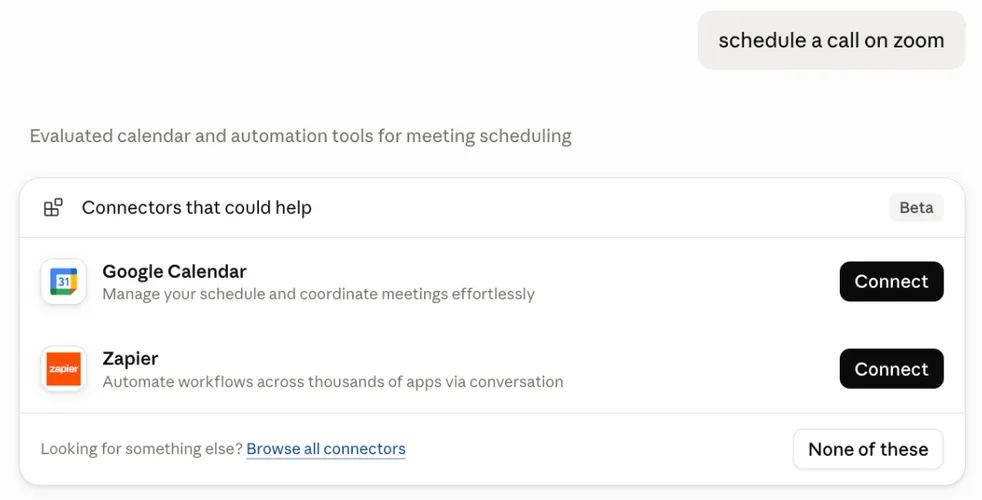
Here is what connector suggestions look like in practice. A user asks Claude to “schedule a call on zoom”. Claude has no calendar connected, so it shows a card:
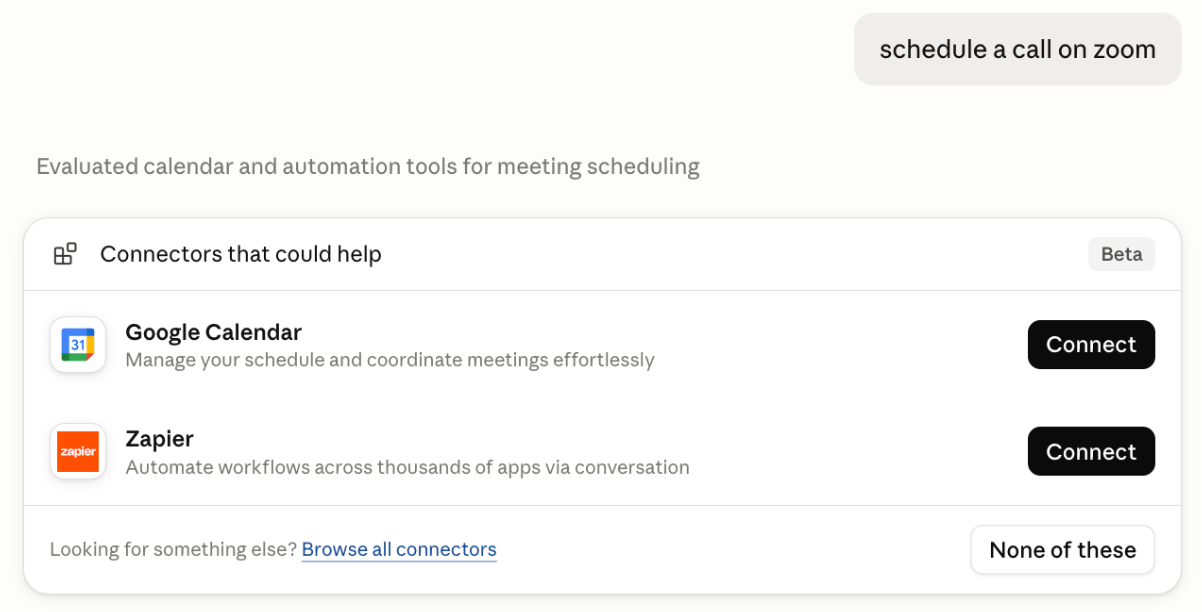
The card offers Google Calendar and Zapier, each with a Connect button, plus Browse all connectors and None of these. The user never searched the directory and may never have heard of either connector. Claude picked them because they fit the request.
In my own testing I also observed how the model gets there. Claude has a built-in tool,
search_mcp_registry, that searches a registry of available connectors when connecting a new one
might help with the user’s request. The results tell the model which connectors the user already
has. A companion tool, suggest_connectors, then shows the ones that are not connected yet, which is
the card above. This is observed behavior, not documented API, and Anthropic may change or remove it
at any time.
In this flow the model reads your listing and tool descriptions and decides whether you fit the task. The user sees the outcome as a card with your name and a Connect button.
How the Claude Marketplace relates to the MCP registry
“MCP registry” can mean two different things, and it helps to keep them apart:
| Catalog | Run by | What it is | Ownership proof |
|---|---|---|---|
| Official MCP Registry | The MCP project (in preview) | Metadata for publicly accessible MCP servers, meant to be consumed by marketplaces and other aggregators | DNS, HTTP or GitHub namespace |
| Claude Connectors Directory | Anthropic | The reviewed catalog Claude users browse and that Suggested Connectors draw from | None required |
Anthropic’s directory page says this directly: domain-ownership proof applies to the open MCP Registry, not to the Anthropic directory. The tool I observed has “registry” in its name, but I have no evidence that it reads the official MCP Registry, so treat the Connectors Directory as the list that counts for Claude.
Claude vs ChatGPT: what each directory asks you to describe
The two big assistants ask for different things when you submit, and the difference hints at how each one plans to match servers to requests.
ChatGPT’s app submission schema asks for at least five positive test cases, prompts your app should handle, and at least three negative test cases, prompts on the other side of the line. Those boundaries are what a model needs to decide when to pick your app on its own. I cover that side in why the ChatGPT plugin directory can be a growth channel.
Claude asks for less. The submission portal has a Use cases step where you describe the main tasks users can accomplish with your connector, what they need before connecting (an account, a plan, other setup) and whether it reads data, writes data or both. In my submission, the form also asked for a few example prompts that show those tasks. MCP Apps that render interactive UI also submit 3–5 carousel screenshots, each paired with the prompt that produced it. There is no negative test case section.
That makes your descriptions carry the weight. Anthropic’s pre-submission checklist asks that each tool description “state precisely what the tool does and when to invoke it”, and it rejects descriptions that tell Claude how to behave or promote products. A clear use case list and narrow tool descriptions help reviewers, and they are likely the same text the model reads when it decides whether to suggest you.
Why the review is strict, and how to pass it the first time
In my view, prompt injection is the main reason Anthropic reviews connectors this carefully. A tool description goes straight into the model’s context. A description that tells Claude to call other tools, fetch instructions from somewhere else or promote a product can steer every conversation where the connector is active. That is why the checklist spends a whole section on these patterns, and why the Verified label involves a person running each tool.
Inspect, MCP Tower’s module for your server’s tools, validates them and their descriptions before
you submit and gives you recommendations: missing titles or readOnlyHint and destructiveHint annotations, catch-all
tools, and descriptions that read like instructions to the model instead of a plain account of what
the tool does. You fix them before a reviewer sees them. Inspect also lets you change tool titles
and descriptions yourself through overrides, so a fix does not wait
for a developer or a deploy.
Test sign-in too. Broken authentication delays review, because a reviewer who cannot connect with
your test account cannot run a single tool. MCP Tower
signs in to your server the way ChatGPT and Claude do and runs each step of the
OAuth flow as a check, from the 401 challenge and discovery documents to token exchange and
refresh. When a step fails, it reports where the flow broke and what to change. Run it before you
submit to Claude or ChatGPT.
For the full submission steps, review times and approval labels, see how to get listed in the Claude Marketplace. For the ChatGPT side, see how to get listed in the ChatGPT plugin directory.
How to make your connector the one Claude suggests
You cannot buy placement in a suggestion card. You can make your server an easy match:
- Describe the task a user completes. “Find open invoices for a customer and send a reminder” matches a user request. “Invoice management platform” does not.
- Write example prompts the way users talk. Short, informal, with the real nouns your users type: “schedule a call on zoom”, not “create a scheduled meeting resource”.
- Keep one job per tool. The checklist rejects catch-all tools that both read and write. Narrow
tools with a
titleand the rightreadOnlyHintordestructiveHintare easier for the model to choose, and read-only tools can run without asking the user to confirm each call. - Return useful errors. Generic errors fail review, and Anthropic’s health badge marks a server “Worth a look” once request errors pass 2% of tool calls over 30 days.
- Publish the URL you will keep. If you change the endpoint behind a listing, users who added the old one keep it and see your connector under Custom instead of as a directory connector, per the directory docs. Decide where your traffic goes before you submit.
Measure what the Claude listing brings you
SEO specialists rely on tools that show which queries bring visitors, which pages convert and what breaks. They change a page, then check the numbers again. A listing in the Claude Marketplace deserves the same loop.
Anthropic gives listed connectors a dashboard in the developer portal: a health badge, directory rank, distinct accounts that used a tool, tool calls, error rates, and usage by Claude product and by tool. It is a good start, with limits the docs state plainly. Metrics are in beta, computed daily and can lag by up to 24 hours. Rows with too few calls are omitted. They count only Claude traffic, so calls from ChatGPT, Cursor or any other client are not there.
The same MCP Tower setup you used to test before submission keeps working after you are listed. It sits in front of your server as a proxy. You point a hostname you own at it with a DNS change, so the URL you publish can stay the same, and every request is recorded on the way through, with no SDK or code change on your server. That gives you:
- Every agent side by side. Tool calls for Claude, Claude Code, ChatGPT and other agents on the same chart, so you can compare what the Claude listing brings with every other channel.
- Per-tool usage and reliability. Which tools get called, how often, how fast and with which errors, filtered by agent, country and date.
- What happens after the call. Users and sessions (with estimates labeled as estimates), widget interactions, and clicks on the links your tools return, so you can follow a call through to a visit on your site.
- Uptime from outside. Scheduled checks list your tools through MCP Tower’s path to your server and record latency and errors, so an outage shows up within minutes instead of in next day’s portal metrics.
- Faster iteration on descriptions. You can override tool titles and descriptions and add prompts without a deploy, then watch whether calls change. Inspect marks every override and warns that a catalog listing may need to be resubmitted, since the live server should match what you submitted.
Because the listing should point at the URL you keep, set up MCP Tower before you submit. You test OAuth and your tool descriptions first, then submit the URL, and the first day of Claude traffic is already measured. See pricing for plans.
Beyond Claude: more directories to list in
Claude is one of several AI assistants that now have a directory for MCP servers. ChatGPT has its plugin directory, and Meta, Perplexity and Google have opened their own. Each one is another place where people can find your server, so look at all of them before you decide where to list first:
- Muse connectors: a new MCP growth channel
- Perplexity connectors: a new MCP growth channel
- Gemini Connected Apps: a new MCP growth channel
- Official MCP Registry: a new MCP growth channel, the upstream that developer catalogs such as Glama and PulseMCP pull from
- Grok Bot Marketplace: a new MCP growth channel, one form for Grok Bot and Cursor users
Conclusion
The Claude Marketplace turns a remote MCP server into something Claude users can find, request from their admins and get suggested in the middle of a task. Listing is open to anyone on a paid Claude plan, ranking follows usage, and the assistant itself does part of the discovery. The teams that get the most from it test sign-in and tool descriptions before they submit, then watch what agents and users do once the listing is live and adjust.
Get started with MCP Tower to test your MCP server before you submit, then see which AI agents use it from the first call.