IntroLesson 1 of 9
What is MCP? A primer on the channel after search
The Model Context Protocol is the open standard that lets an AI assistant call a product’s tools in the middle of a conversation. This lesson explains the channel in SEO terms, shows why discovery inside the assistants will make it grow, and gives you the vocabulary for the rest of the course.
What is MCP? The channel after search
Section titled “What is MCP? The channel after search”More and more people ask ChatGPT or Claude the questions they used to ask Google. For an informational query, the answer may cite your page. For a task (“book a table”, “check my order”, “what does gold cost today”), the assistant needs a way to act on a product’s data, and an MCP server gives it one.
Think of an MCP server as a website built for AI agents instead of people. It is a small web service the product’s team runs, and it publishes a list of tools. Each tool is like a landing page: it does one job, carries a description of what it offers, and has a form to fill in. The visitor is the assistant, deciding mid-conversation whether your page is the right one to use. When it picks a tool, it calls the tool and uses the result in its answer. Some tools return a link back to the product’s site; some render a small interactive card inside the chat, called a widget. Your goal is to make sure the assistant picks your tool and gets the job done with your product.
The official introduction at modelcontextprotocol.io covers the protocol itself; you will not need to read code to follow this course.
For a user to reach a server, the assistant has to know it exists. Today that happens in two ways. The user can add the server’s URL by hand, which mostly technical users do. Or the server is listed in the assistant’s directory: the ChatGPT plugin directory, Claude’s Connectors Directory, and similar catalogs at Gemini, Grok, Muse and Perplexity. A listing is to the agent channel what an indexed page is to search. Lesson 3 covers how listings get there.
MCP discovery: why the channel will grow
Section titled “MCP discovery: why the channel will grow”Few people will scroll a catalog of connectors the way they once browsed app store charts. The bigger change is that the assistants are starting to find the right server on their own, the way a search engine finds the right page for a query.
Claude suggests connectors mid-conversation
Section titled “Claude suggests connectors mid-conversation”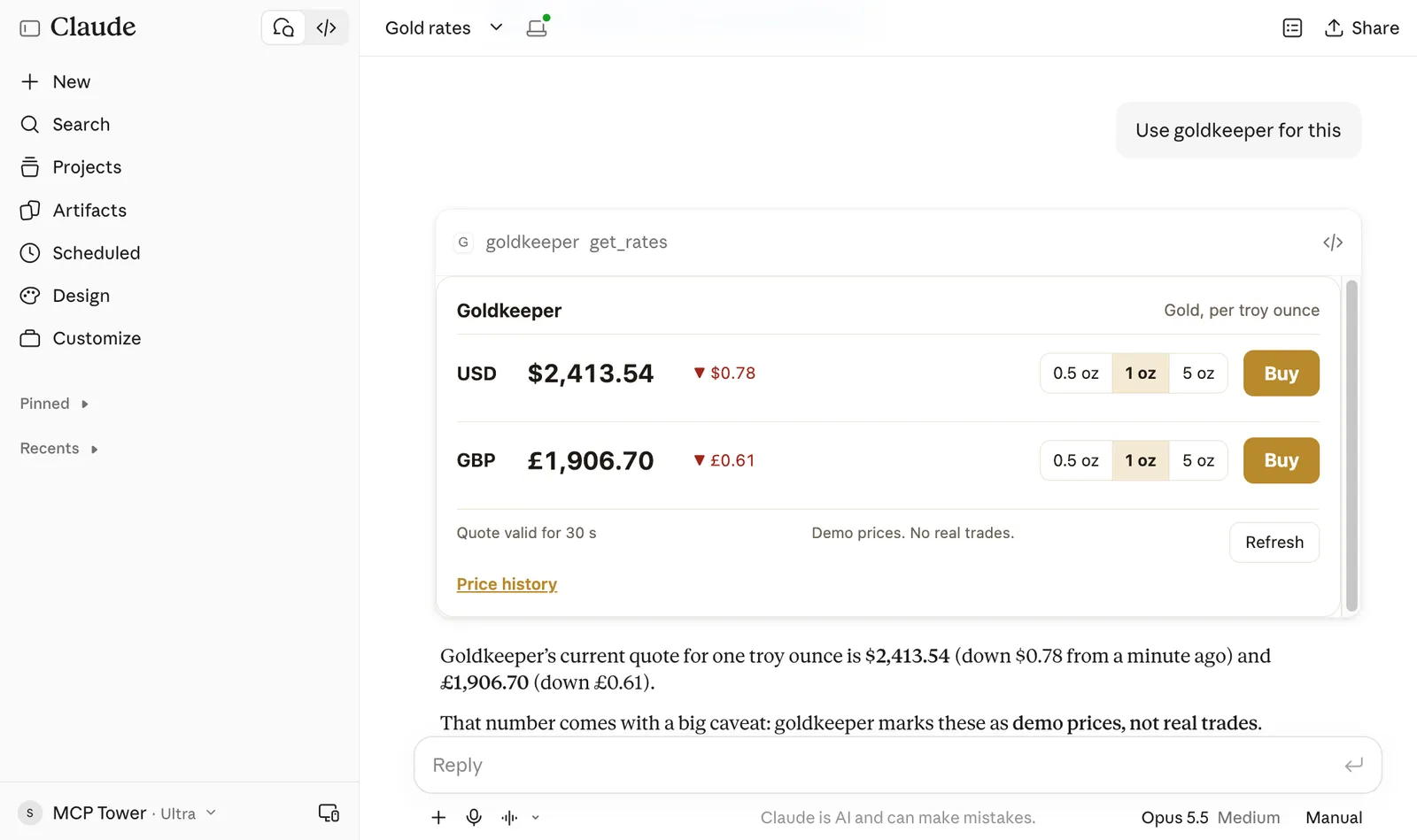
Claude searches the connector directory mid-conversation and suggests connectors the user never asked for.
Ask Claude to “schedule a call on zoom” with no calendar connected, and it can answer with a card
titled “Connectors that could help”, with a Connect button for each suggestion. The user never
searched the directory and may never have heard of those connectors. Anthropic documents that
directory connectors are eligible for these suggestions when they fit the user’s task. In testing,
Claude has been seen calling a built-in tool, search_mcp_registry, to look for connectors that
might help, and then showing the ones the user has not connected. That tool is observed behavior,
not a documented API, and Anthropic may change it at any time.
ChatGPT asks when your app should trigger
Section titled “ChatGPT asks when your app should trigger”OpenAI’s submission bundle asks for positive test cases (prompts your app should handle) and negative ones (prompts where it should stay out of the way). OpenAI says those cases are for the review team and does not say they feed discovery. Our reading is that they rehearse it: an app whose owner knows when it should and should not run is an app the model can pick by itself. OpenAI’s metadata guide says plainly that ChatGPT decides when to call a tool based on the metadata you provide.
Both hosts are heading toward the same place: matching a user’s request to an MCP server from its listing and descriptions, without the user naming it. That works like search, with the model as the ranking algorithm and the tool description as the snippet. It is also early. Prompt injection (text that tries to steer the model) is one reason the assistants still ask users before many actions, and discovery will widen as that risk is brought under control. Tell stakeholders both halves of that story.
MCP for SEO: the dictionary
Section titled “MCP for SEO: the dictionary”Keep this table open for the rest of the course. Each lesson uses these terms.
| In SEO | In MCP | What carries over |
|---|---|---|
| Website | MCP server | The thing you publish, at its own URL |
| Page | Tool | One job, one description, one reason to be chosen |
| Title tag and meta description | Tool name, title and description | The text the model reads to decide whether you match the request |
| Search engine | Catalog or directory (ChatGPT, Claude, Gemini, Grok and more) | Where users and models find you |
| Indexing | Listing | You are eligible to be found, which is not the same as being found |
| Submitting a sitemap | Publishing server.json to the official MCP Registry | A machine-readable entry that other catalogs pull from |
| Search query | The user’s prompt | Users describe outcomes and rarely type your brand name |
| Ranking | The model choosing your tool | Decided by how well your descriptions match the request |
| Negative keywords | Negative test prompts | Requests where your tool should not run |
| Featured snippet | A widget rendered in the answer | Your content shown inside the result, with buttons |
| Organic click | A click on a link returned by a tool | The visit back to the product’s site |
| Crawl errors and downtime | Tool errors and uptime | A broken tool loses the user in the middle of the conversation |
| Broken canonical | Drift | The live server no longer matches what the catalog reviewed |
| Search Console | The host’s developer dashboard plus your own MCP analytics | Each host reports only its own traffic, so you need a view across all |
Ranking has no position number here: the model either calls your tool or it does not, so the number to watch is tool calls per agent over time (lessons 5 and 7).
Meet the example: Gold Keeper
Section titled “Meet the example: Gold Keeper”Every lesson uses the same example. Gold Keeper is a made-up gold dealer, and your job is to grow its MCP server for its stakeholders. The server has four tools:
get_ratesreturns the price of an ounce of gold in USD and GBP. It needs no sign-in and renders a rates widget with Buy buttons.get_balancereturns the signed-in customer’s cash, gold and recent purchases.buy_goldbuys gold and returns a receipt link.sell_goldalways fails, on purpose, so you can see what an error looks like.
The last three need the customer to sign in. Agents reach the server at
https://mcp.goldkeeper.net/. It runs through MCP Tower, so lesson 9
can show its real usage data.
Look at an MCP server without installing anything
Section titled “Look at an MCP server without installing anything”The Online MCP Inspector is a free page on this site. Paste the URL of a remote MCP server, press Connect, and it lists the server’s tools, prompts and resources in plain language. You can run any tool and read the result, without an account. It is the equivalent of viewing a page’s source before an audit.
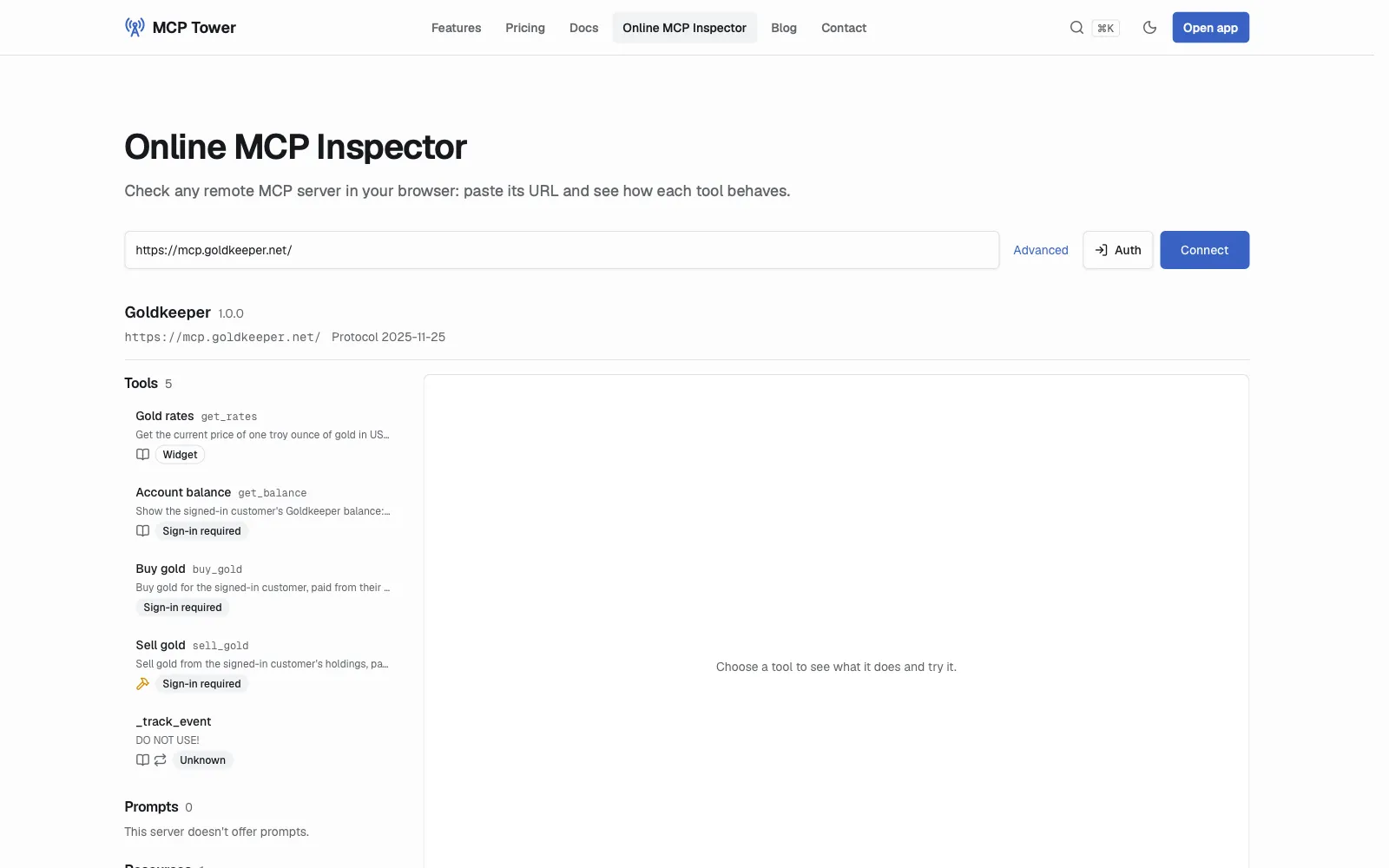
Gold Keeper in the Online MCP Inspector: four tools of its own, three behind sign-in, plus MCP Tower’s _track_event.
Read each tool’s description the way you would read a title tag on a page you optimize. Is it clear what the tool does? Would a model know when to call it from the description alone? Note which tools carry a sign-in badge, because those need OAuth before they run.
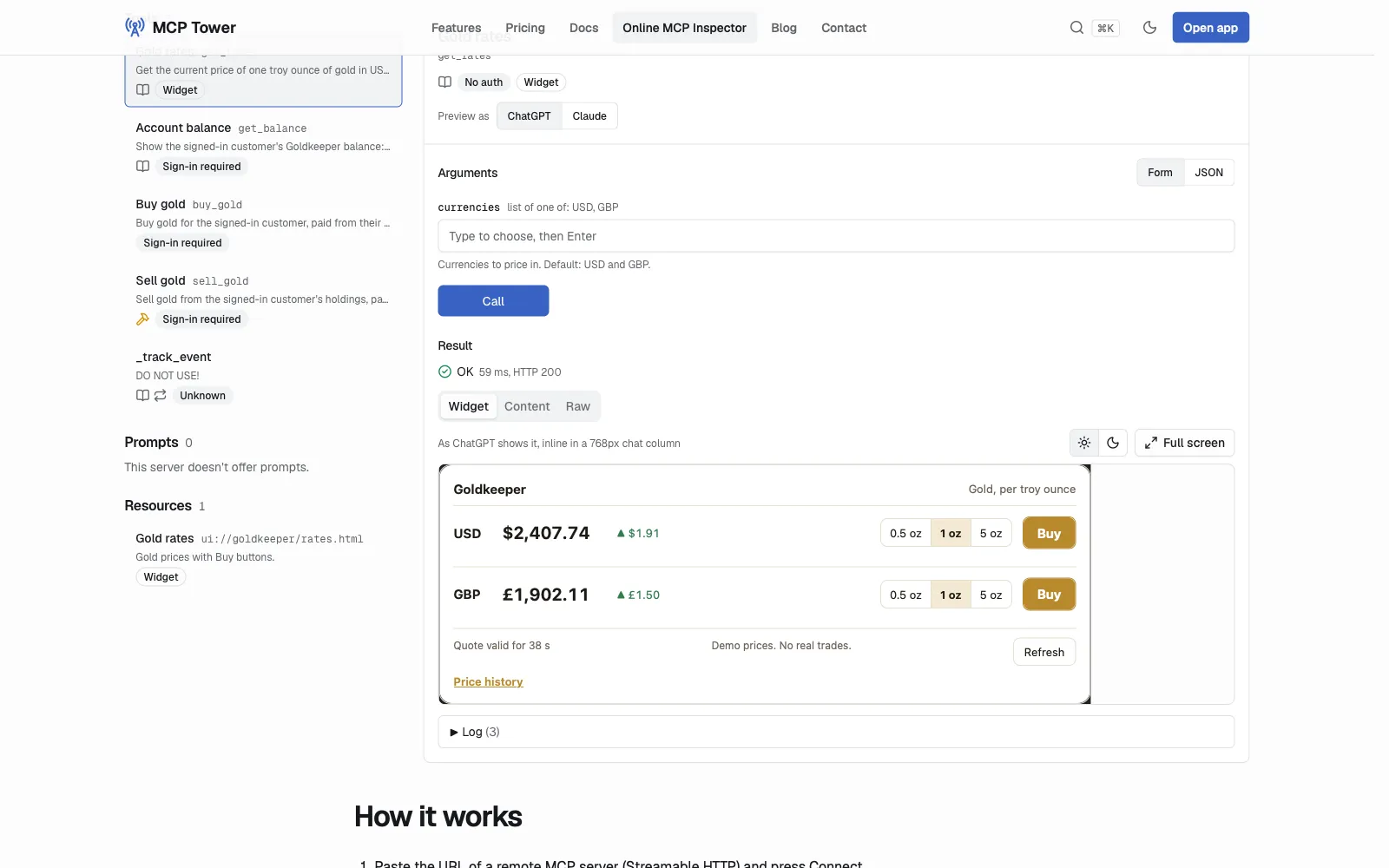
get_rates run in the inspector: the result rendered as the widget ChatGPT would show.
When you run get_rates, the result comes back as text. The tool also declares a widget, so the
inspector can render it the way ChatGPT or Claude would. That widget is the featured snippet from
the dictionary: the product’s content inside the answer, with a button that leads to a purchase.
Your task
Section titled “Your task”Gold Keeper is a dummy MCP server, safe to experiment with: the prices are demo prices, nothing is traded, no money moves and it never asks for payment details.
- Open the Online MCP Inspector.
- Paste
https://mcp.goldkeeper.net/and press Connect. - Count the tools (four of Gold Keeper’s own, plus
_track_event) and note which ones need sign-in. - Select
get_rates, keep the default currencies and run it. Read the text result, then look at the widget. - For each of the four tools, write one line: what the tool does, in your own words, and a user prompt you think would make an agent call it. Keep the list, because lessons 2 and 7 reuse it.
- If your stakeholders already have an MCP server, repeat steps 2 to 5 with its URL. If they do not, ask their engineers whether one is planned.
Check yourself
Section titled “Check yourself”What is the SEO twin of a tool description, and why does it matter?
The title tag and meta description. The model reads the description to decide whether the tool matches the user’s request, the way a searcher reads your title before clicking. If the description is vague, the model passes over the tool, just as a searcher passes over a page with a vague title.
Why does automatic discovery matter more than browsing a directory?
Most users will never browse a catalog of connectors. When the assistant itself looks for a server that fits the request, as Claude does with suggested connectors, the user reaches a product they never searched for. The web made the same jump when people stopped typing addresses and started searching.
In the inspector, why did get_rates run without sign-in while get_balance did not?
get_rates returns public demo prices, so it declares no sign-in. get_balance reads one
customer’s account, so it requires OAuth sign-in before it runs. A well-built server asks for
sign-in only where the data is personal, which also lets a new user try it without creating an
account first.
Go deeper
Section titled “Go deeper”- Why the ChatGPT plugin directory can be a new growth channel
- Claude Marketplace: a new MCP growth channel
- Gemini Connected Apps: a new MCP growth channel
- Grok Bot Marketplace: a new MCP growth channel
- Muse connectors: a new MCP growth channel
- Perplexity connectors: a new MCP growth channel
- Official MCP Registry: a new MCP growth channel
- What is the Model Context Protocol?, the official introduction
- Next lesson: Add an MCP server to ChatGPT and Claude