IntroLesson 2 of 9
Add an MCP server to ChatGPT and Claude
Search Console’s live URL test shows how Google renders a page before it is indexed. Adding an MCP server to ChatGPT, Claude or any other AI assistant by URL is the same move for the agent channel: any remote server can be added with no listing, only the person who added it sees it, and you learn what the assistant does with your server before any directory has listed it. This lesson walks you through testing a server in ChatGPT and Claude: how to run a tool and how sign-in works. It also shows how each assistant renders a widget, the small interactive card a tool draws inside the answer, and why widgets matter for conversion.
What a remote MCP server is
Section titled “What a remote MCP server is”MCP servers come in two kinds. A local server runs on the user’s own computer and is set up by
developers in a configuration file. A remote MCP server runs on the internet at an https:// URL,
like a website, and that is the kind ChatGPT and Claude can add from their settings and the kind the
directories list. Every server in this course is remote.
Even if your MCP server is not listed in any catalog, anyone can use it by URL. Adding a remote
server this way gives the full experience, for that one account, while you wait for a
directory listing. Gold Keeper’s MCP URL is https://mcp.goldkeeper.net/. Sign in with the demo account:
email [email protected], password demo.
Add an MCP server to ChatGPT
Section titled “Add an MCP server to ChatGPT”In ChatGPT, servers you add yourself become plugins (ChatGPT’s name for an integration built on an MCP server). The shape of the steps, from OpenAI’s plugin quickstart:
- Open ChatGPT Plugins.
- Select the plus button, then Add custom MCP server.
- Enter a name (“Gold Keeper”) and the server URL
https://mcp.goldkeeper.net/. - Choose OAuth as the authentication. Gold Keeper’s tools for balance and trading need it.
- Read the risk warning and confirm.
- Select Create as a plugin, and sign in to Gold Keeper when the sign-in page opens.
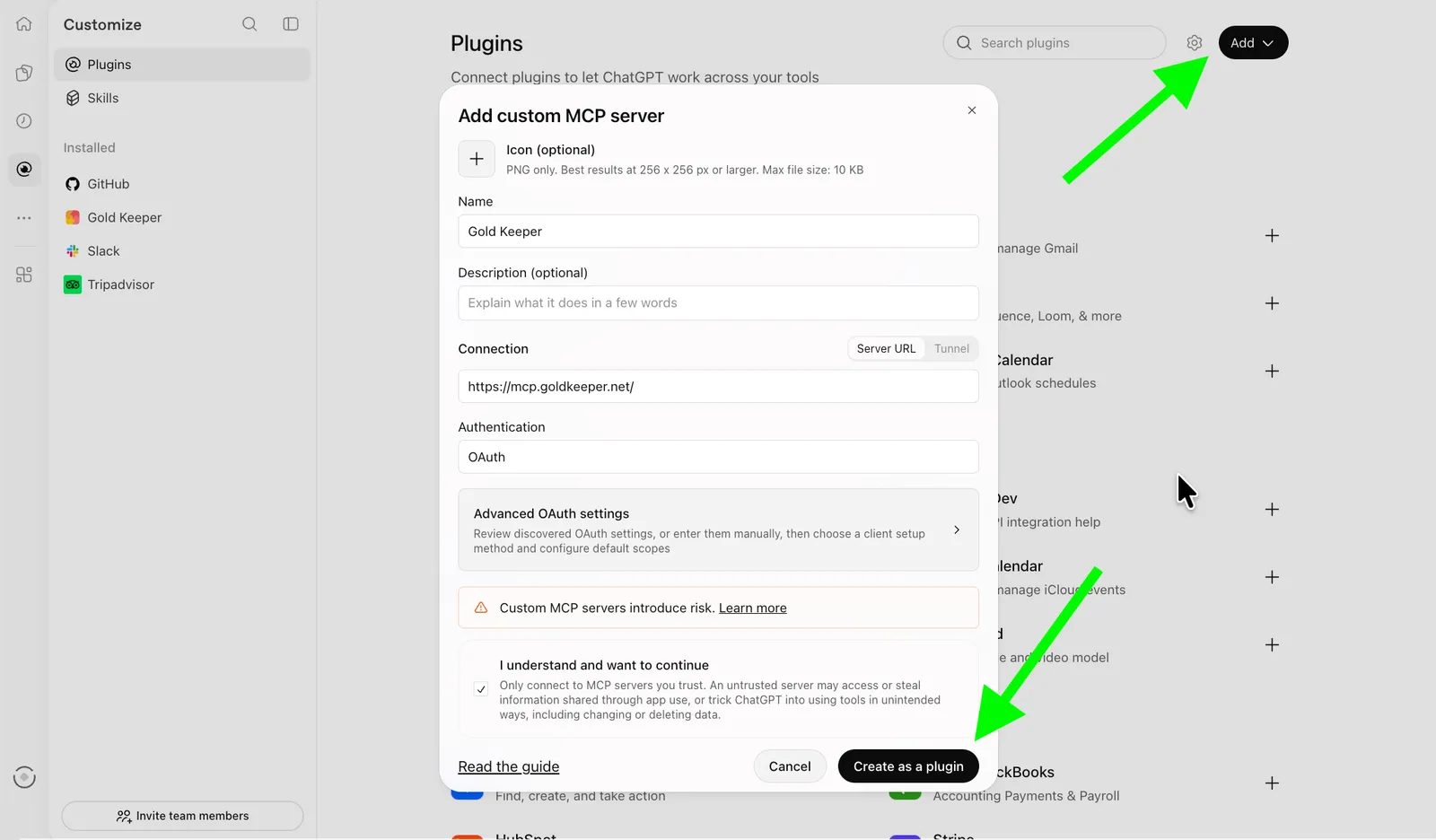
Adding Gold Keeper in ChatGPT: Add, then the custom MCP server dialog, then Create as a plugin.
Step 4 matters for Gold Keeper. ChatGPT shows an in-chat sign-in prompt only when the server sends
an extra hint that Gold Keeper does not send, so with Gold Keeper the account is linked when you
add the server. If you choose no authentication, get_rates still works and the protected tools
fail.
Now open a new chat with the plugin enabled and ask “What are gold rates today?” ChatGPT should
call get_rates and show the rates widget.
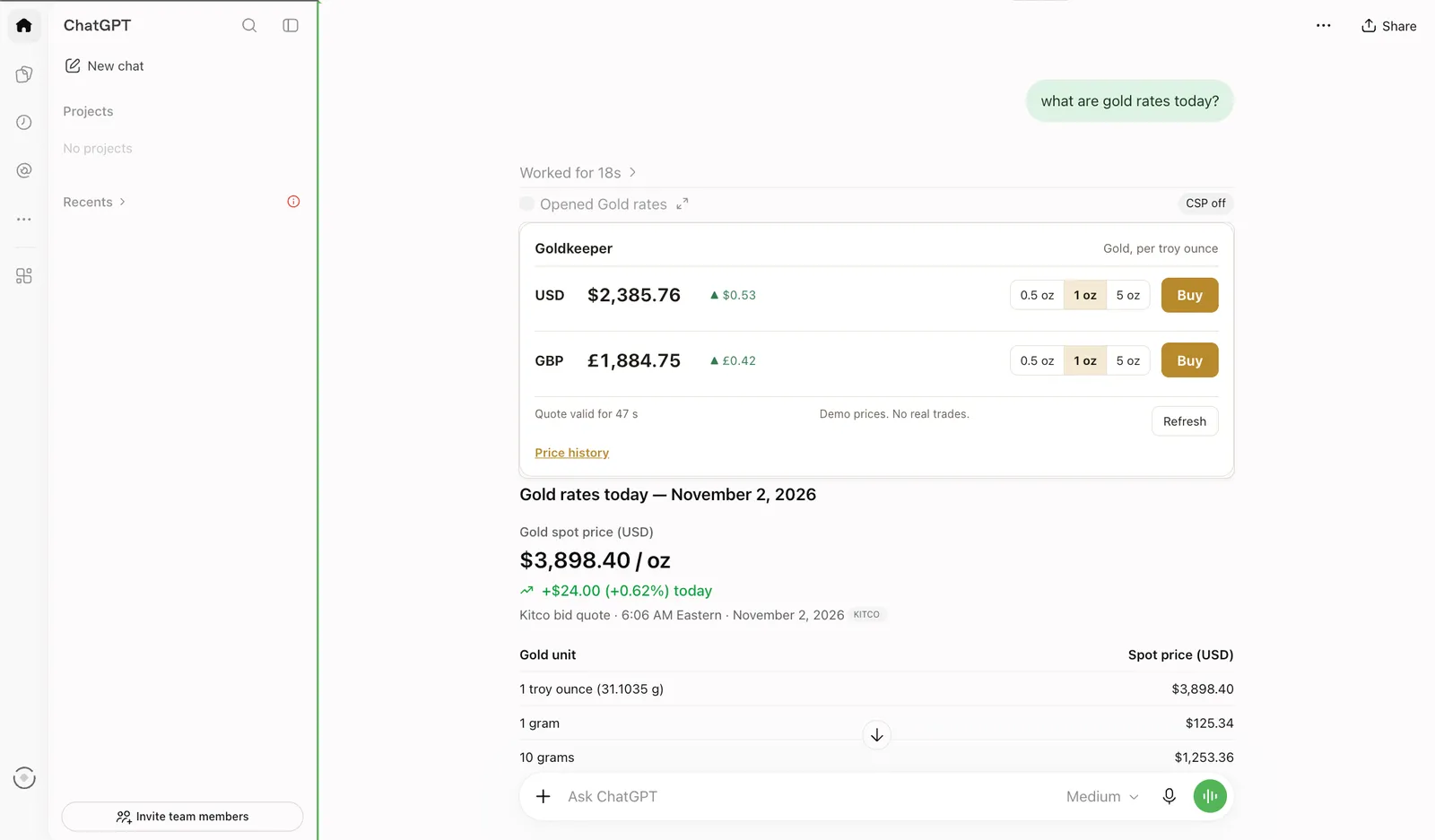
ChatGPT renders Gold Keeper’s rates widget above its own answer.
Then ask “What’s my balance?” Because you signed in when you added the server, ChatGPT can call
get_balance straight away.
Add a Claude custom connector
Section titled “Add a Claude custom connector”Claude calls these integrations connectors. Per Anthropic’s help article on custom connectors, custom connectors work on Free, Pro, Max, Team and Enterprise plans, with one custom connector on Free. On Team and Enterprise, only an Owner can add one. The steps, in shape:
- In claude.ai, open Customize, then Connectors.
- Choose to add a custom connector.
- Enter a name and Gold Keeper’s URL, and add it.
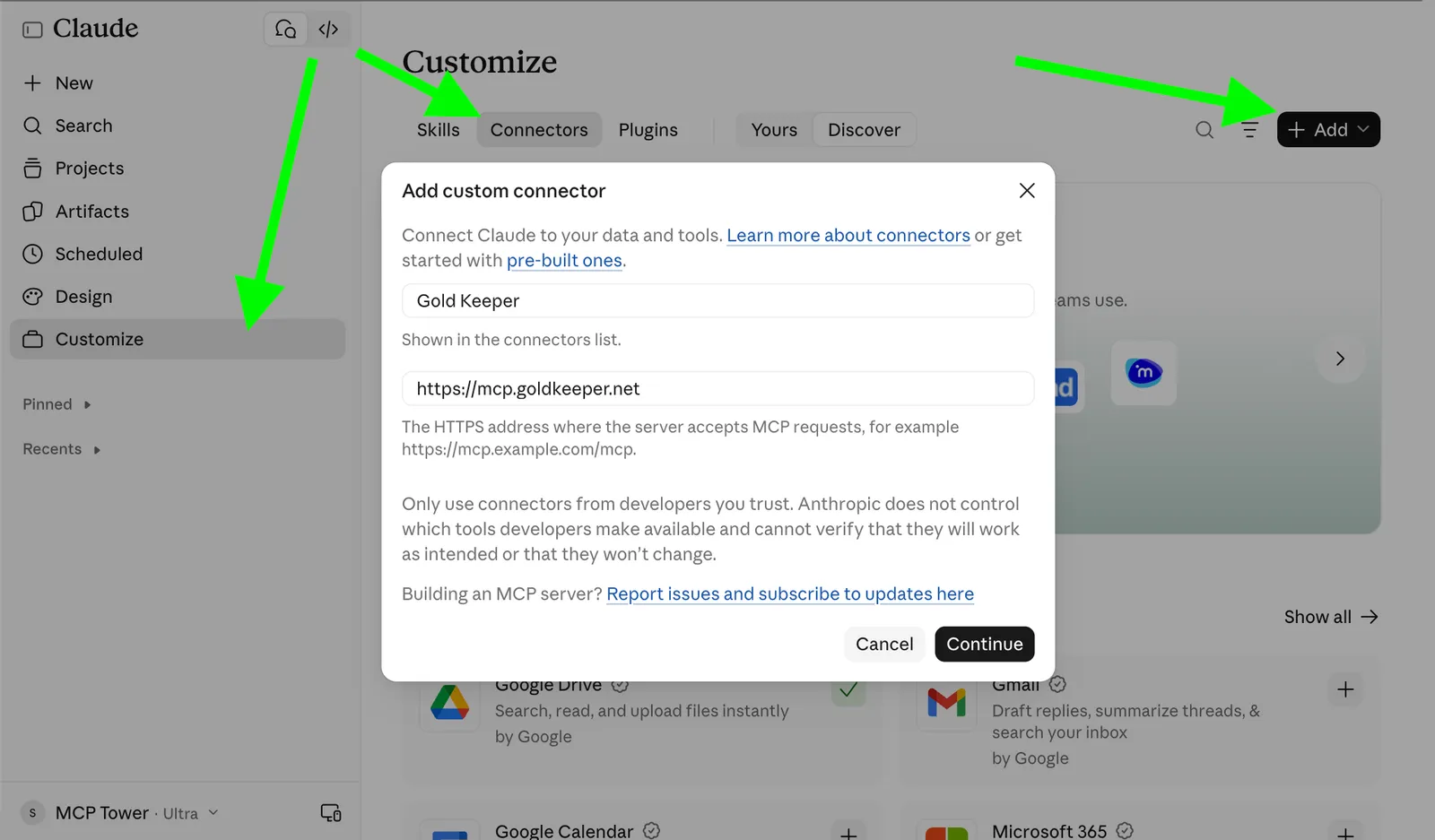
Adding Gold Keeper as a custom connector in Claude: Customize, Connectors, then Add.
Start a new chat with the connector enabled and ask for gold rates. Claude calls the same tool and renders the same widget in its own frame.
Claude renders the same widget in its own frame, under the tool call.
Ask for your balance. get_balance needs sign-in, so Claude asks you to connect your Gold Keeper
account before the tool runs.
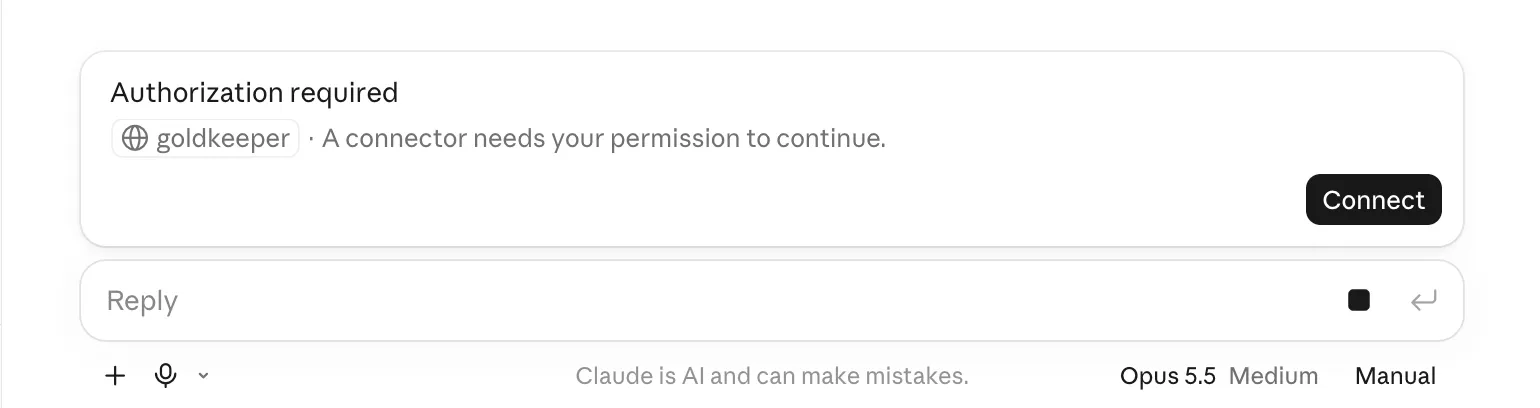
Claude asks for sign-in when a tool needs it.
Sign in with the demo account: email [email protected], password demo. Gold Keeper’s consent
page lists what the connector may do in plain words (“See your balance”, “Buy and sell gold”), with
a checkbox for each. Allow both, and the balance comes back.
How each assistant renders an MCP Apps widget
Section titled “How each assistant renders an MCP Apps widget”A widget is a small web page that a tool asks the host to display next to its result. The assistant renders it in the conversation, and the widget can have links and buttons and call the server’s other tools. The assistant decides the frame, the width and whether the widget opens inline or full screen, and this behavior varies by assistant. It may also skip the widget entirely and answer the user from the tool’s response alone.
What a widget does for conversion
Section titled “What a widget does for conversion”In search, a featured snippet answers the question on the results page. A widget goes one step
further and lets the user act there. To demonstrate that, Gold Keeper’s rates widget
shows a price per ounce for each currency, an amount picker and a Buy button. Pressing
Buy calls buy_gold through the host, and the result comes back in the same card
with a View receipt link to Gold Keeper’s site.
Without a widget, the user reads a price, opens a new tab, finds the product and starts again. With one, intent and action sit in the same card, and you get something to measure: widget loads, button clicks and the link that leads back to the site. Lesson 6 shows how to measure those events.
Try the button. Then ask the assistant to sell an ounce: sell_gold always fails with a blocked
transaction message, so you see how each host shows a tool error to the user.
Brief for the engineer
We want to test our MCP server as a private connector in ChatGPT and Claude, before we submit it to their directories. Here are the common requirements:
- Remote and public. The server answers on a public
https://URL over Streamable HTTP. Claude connects from Anthropic’s cloud and ChatGPT from OpenAI’s, so localhost and VPN-only hosts will not work. Pick the hostname we will keep; directories tie a listing to it. - OAuth, if any tool needs a user account. A protected
tools/callwithout a token answers HTTP401withWWW-Authenticatepointing at our protected resource metadata. The authorization server supports PKCE and dynamic client registration (or client ID metadata documents). Tools declaresecuritySchemes. For ChatGPT to show sign-in in the middle of a chat, a tool result also needs_meta["mcp/www_authenticate"]; without it, users link their account when they add the server. MCP Tower’s OAuth checks sign in the way ChatGPT and Claude do and report the first step that fails. - Tool metadata. Every tool has a
titleand areadOnlyHintordestructiveHintannotation, and a description that says what the tool does and when to use it. - Widgets. If a tool renders UI, it declares an MCP Apps resource (
_meta.ui.resourceUri, served astext/html;profile=mcp-app) and, for ChatGPT’s templates,_meta["openai/outputTemplate"](text/html+skybridge). Links opened from the widget go through the host’s open-link call. - A demo account with realistic data and no MFA, which we will also need for the directory reviewers.
You can check the result yourself in the Online MCP Inspector: it lists the tools, runs them, signs in with OAuth and renders widgets the way ChatGPT and Claude would.
Your task
Section titled “Your task”Gold Keeper is a dummy MCP server, safe to experiment with: the prices are demo prices, nothing is traded, no money moves and it never asks for payment details.
- Add
https://mcp.goldkeeper.net/to ChatGPT as a custom MCP server with OAuth, and sign in with[email protected]and the passworddemo. - In a new chat, ask “What are gold rates today?” and wait for the widget.
- Ask “What’s my balance?”, then press Buy in the widget for 0.5 oz and open the receipt.
- Add the same URL to Claude as a custom connector. Ask for rates, then for your balance, and sign in when Claude asks.
- Note three differences between the hosts: how the widget looks, when sign-in happened, and how
each one showed the
sell_golderror. - Repeat steps 1 to 4 with your stakeholders’ server. If they have none yet, send the brief for the engineer above and do this step when they reply.
Check yourself
Section titled “Check yourself”Why did ChatGPT ask you to sign in when you added Gold Keeper, while Claude asked mid-conversation?
ChatGPT shows sign-in inside a chat only when the server sends a ChatGPT-specific hint with the tool result. Gold Keeper answers a protected call the way Claude and the MCP specification expect, without that hint, so in ChatGPT the account is linked when the server is added. Claude reacts to the standard answer and asks at the moment a tool needs it.
Your server’s widget shows in Claude but not in ChatGPT. What do you ask the engineer first?
Which widget formats the tool declares. If it declares only one format and ChatGPT does not read it, the result arrives as plain text. The fix is on the server, and the brief above lists both fields.
What is the SEO twin of a widget, and what does it add?
A featured snippet: the product’s content inside the result. A widget adds action, because buttons such as Buy call the server’s tools from inside the answer, and the links in it lead back to the product’s site. That shortens the path from intent to conversion and gives you clicks to measure.
Go deeper
Section titled “Go deeper”- OpenAI plugin quickstart: adding a custom MCP server in ChatGPT
- Get started with custom connectors using remote MCP, Anthropic’s help center
- MCP Apps, the open extension for widgets
- How to submit a plugin to ChatGPT, step 4: testing privately
- How to submit a connector to Claude
- OAuth checks in MCP Tower
- Previous lesson: What is MCP? Next lesson: How to get listed in an MCP directory