GrowLesson 9 of 9
Streamline MCP growth with MCP Tower
The first eight lessons taught the work with any tools you like: a fact sheet and a tracker for submissions, UTMs and logs for measurement, descriptions shipped by the engineers, skills written by hand. Even for one person and one server, keeping track of all of it by hand is hard: checking each directory’s status, piecing usage together from logs, comparing the live tool list with what was submitted, and rebuilding the numbers for every report take hours of manual work each month. And growth needs more people: an engineer who owns the server, a product owner who decides what it does, a marketing lead who wants to know whether it pays off, executives who ask “how is the ChatGPT thing going?”. With every stakeholder holding a piece, the work scatters across spreadsheets, inboxes and release queues, and each change waits on someone else. This last lesson is about streamlining that: how MCP Tower keeps distribution, tracking, changes to tools and the material for skills in one place that every stakeholder can look at, how one slide a month keeps them aligned, and a steady rhythm that turns the course into routine. It ends with the capstone: one server listed, measured and reported in 30 days. Be honest with stakeholders throughout: the channel is small and new, and listings take weeks.
How MCP Tower keeps MCP growth in one place
Section titled “How MCP Tower keeps MCP growth in one place”MCP Tower sits in front of the MCP server. You point the server’s public hostname at MCP Tower with a DNS change, every request passes through to the server, and MCP Tower records it. The URL agents use can stay the same. There is no SDK and no change to the server’s code. Everything below hangs off that one DNS change.
Distribution and tracking submissions
Section titled “Distribution and tracking submissions”Lesson 4 built the submission process by hand. Distribute, MCP Tower’s submission module, holds the same pieces for each server:
- The fact sheet as a questionnaire. One profile per server, filled in once, with each field showing which catalogs ask for it and the strictest character limit among them. The technical answers (URL, transport, sign-in, tools) come from MCP Tower’s own scan of the server.
- Checks before you submit. The things reviewers reject most often (tool titles and descriptions, hints, OAuth setup, missing test accounts, assets) are checked on every scan, per catalog.
- Each catalog’s output in the form that catalog takes: answers to copy into its form, the
ChatGPT plugin bundle, or
server.jsonfor the official MCP Registry, which MCP Tower publishes when you click. For every other catalog, the server’s owner submits under its own account. - The tracker. Each catalog’s status (missing, reviewing, published) with its history, emails to the organization’s Admins and Editors when a status changes, and a drift warning when the live server no longer matches what a catalog reviewed.
MCP Tower also has its own MCP server, at https://mcp.mcptower.com/, and a submission skill,
submit-mcp-to-catalog, for agents that load Agent Skills (Claude Code, Claude Desktop, claude.ai,
Codex and others). Connected to the owner’s own agent, the server hands over each catalog’s
submission data: every form field in the catalog’s order, with its value and limit. The skill then
fills in the catalog’s form in the owner’s browser, signed in as the owner, and stops for them to
confirm each attestation and the final submit. A 68-question form becomes a review instead of an
afternoon of copying. The MCP server is a paid feature for activated servers.
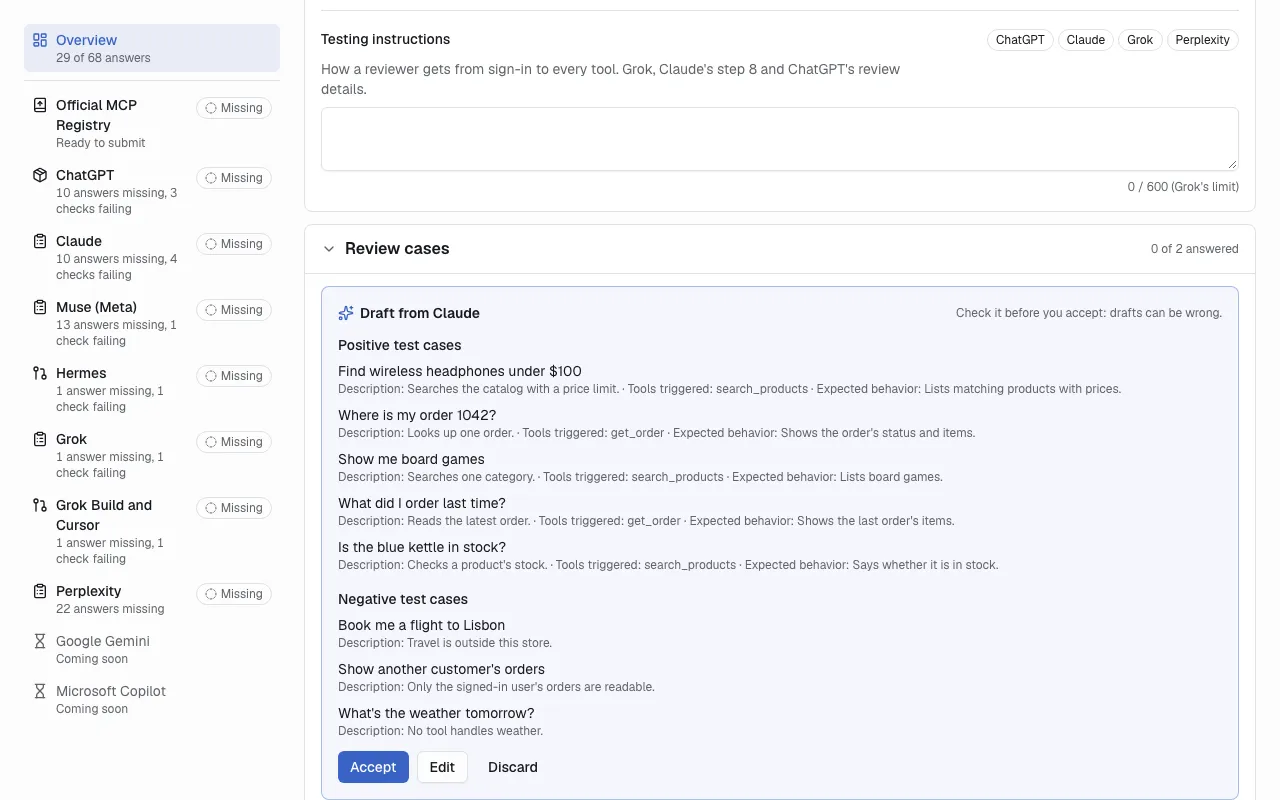
Distribute: every catalog’s status in one list, with drafted answers to check and accept.
Tracking and measurement
Section titled “Tracking and measurement”Lessons 5 and 6 listed what to measure and how to build it yourself. MCP Tower records it from the same DNS change, on one Measure page per server:
- tool calls by tool and by agent, with the agent identified from several signals, not only the name a request claims (lesson 5’s impostor problem);
- users and sessions, counted from the signals available and labelled approximate;
- errors by kind and by tool, latency, and a live stream of calls for debugging;
- widget loads and clicks, from a tracking script MCP Tower adds to the widget, with no change to the widget’s code;
- clicks on links in tool results, which MCP Tower rewrites into tracking links joined to the tool call and the agent;
- uptime checks that list the server’s tools over MCP every minute, signed in when the server needs it, so an outage shows up even when nobody is calling.
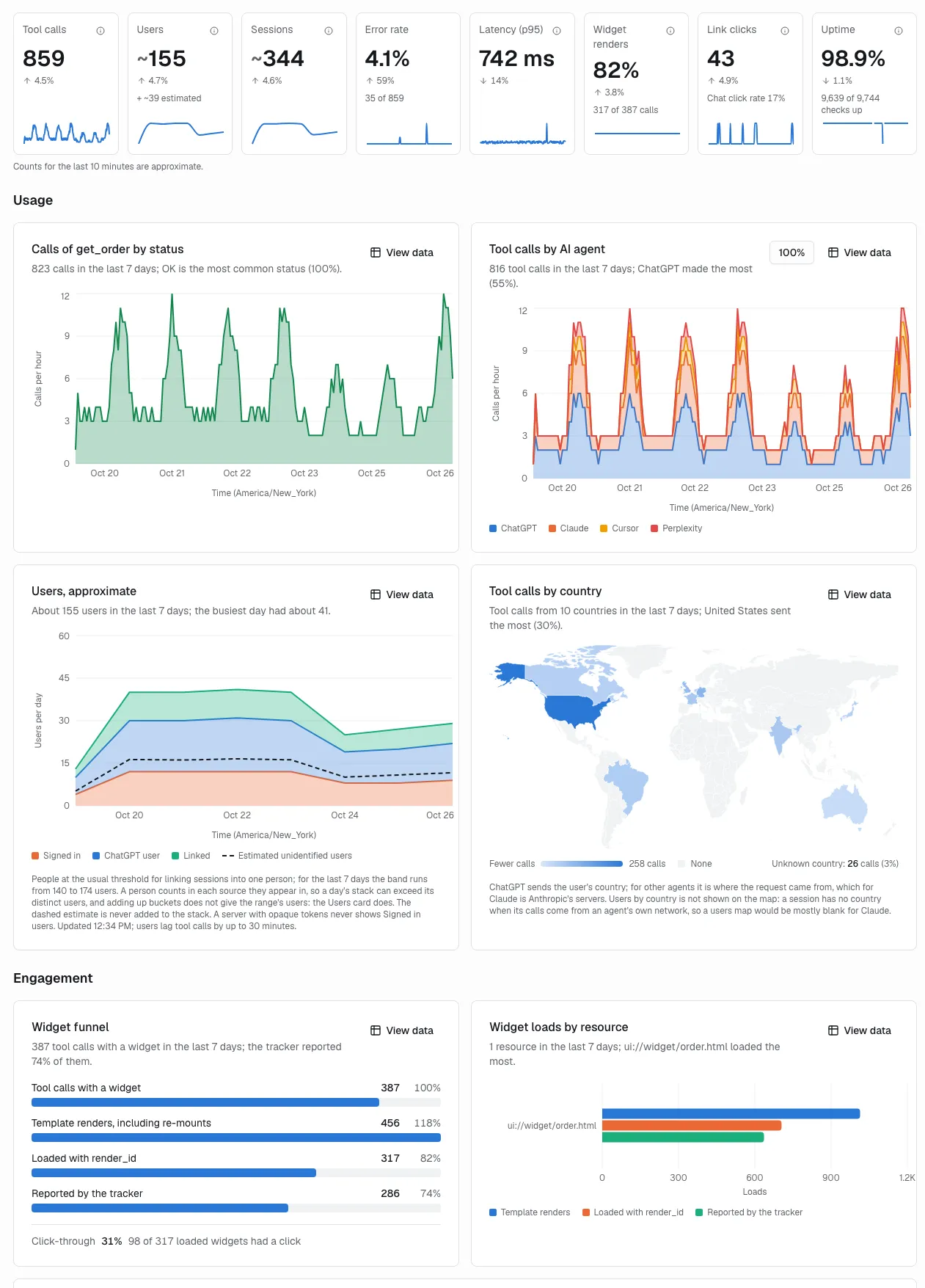
The Measure page: the KPIs and the charts behind them on one screen.
Tweaking tools without a release
Section titled “Tweaking tools without a release”Lesson 7 asked the engineers to ship each new description. In MCP Tower an Admin or Editor can change a tool’s title and description, and any argument’s description, as an override: MCP Tower replaces the text on the way to the agents, and the server keeps its own. Inspect shows both versions, the audit log records who changed what and when, and MCP Tower warns that a listed server may need resubmitting. When a change proves itself, the engineer copies it into the code and the override is removed. Admins and Editors are also emailed when the server’s own tools or descriptions change, so a release nobody mentioned does not surprise you.
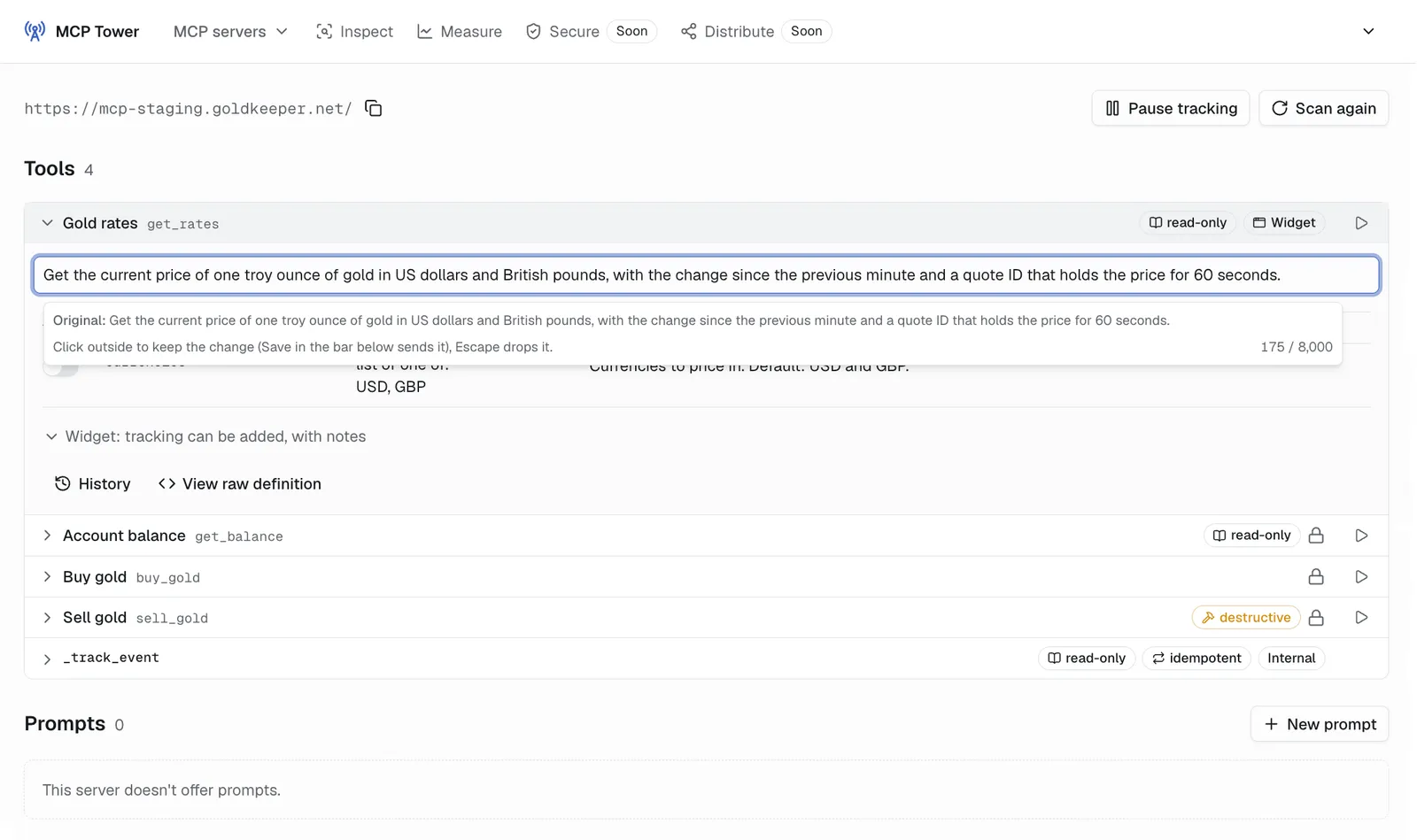
Inspect: edit a tool description, with the original kept next to it.
Prompts and skills
Section titled “Prompts and skills”Lesson 8 had you write prompts for the engineers to add. MCP Tower prompts are served next to the server’s own prompts, without a release, written and previewed in Inspect. For skills, Inspect is the source you write from: every tool with its description and arguments in one list, plus a Run button to try each one. The live stream shows the order agents actually call the tools in, which is where a multi-step job breaks and where a skill earns its place.
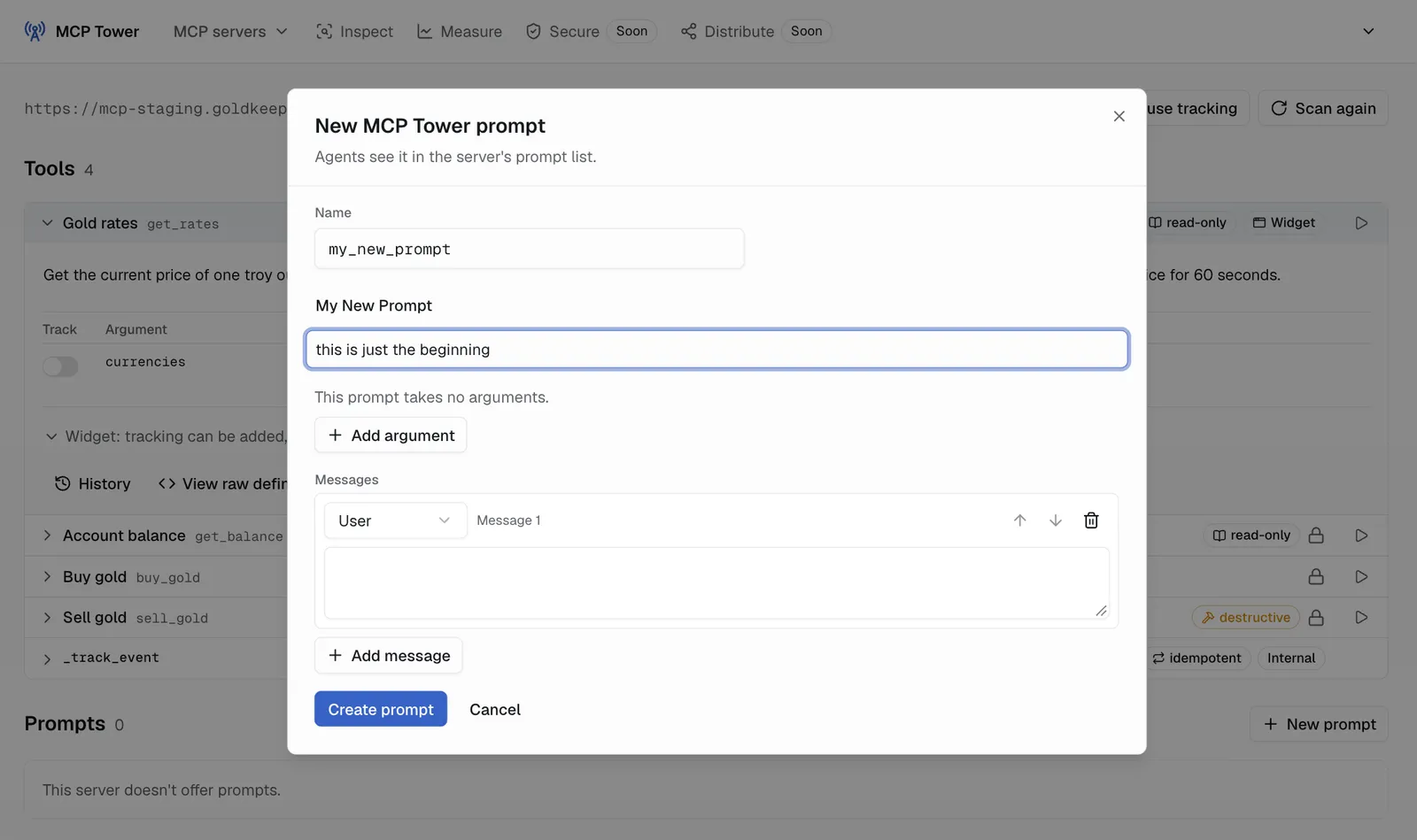
Add a prompt to the server from Inspect, without a deploy.
One place for every stakeholder
Section titled “One place for every stakeholder”An MCP Tower organization holds several MCP servers, and every member sees the same data with the role they need: View for the marketing lead and executives, Edit for you and the engineers who change texts and run tools, Admin for whoever manages members and billing. The engineer, the product owner and the SEO specialist read the same numbers, the same change history and the same submission status. That is what streamlines growth: nobody rebuilds a spreadsheet to answer a question, a description change does not wait for a release, and the monthly review starts a conversation instead of a debate about whose numbers are right.
What goes in the MCP growth report
Section titled “What goes in the MCP growth report”Stakeholders read reports in under a minute, and this one should read faster. Five lines, each from one place on the server’s Measure page, for the last month compared with the month before:
| Line | Where it comes from | How to say it |
|---|---|---|
| Usage by agent | The tool calls card and the AI agent chart | For example, “a third of all tool calls came from Claude, up from a fifth” |
| Top tools | Tool calls over time, and Errors by tool | The two or three tools agents use most, and any with a high error rate |
| Clicks back to the site | The link clicks card and Top links | How many people opened a link the server returned, and which link |
| Uptime | The uptime card and the status strip | The uptime percentage and the number of outages |
| One recommendation | You | The single change you will make next month, and the number it should move |
Some notes on each line:
- Usage by agent is the headline, the agent channel’s version of sessions by source. If you show users, show them with their label: MCP Tower counts users from several signals and marks the count as approximate. Tool calls are the firmer number.
- Top tools shows what the product is actually useful for in an AI conversation. A tool that nobody calls, or that fails for one agent, is often where your recommendation comes from (lesson 7).
- Clicks back to the site is the line the marketing lead cares about most, because it connects the agent channel to the company’s own funnel. What those visitors do after they arrive is in the web analytics, as lesson 6 showed.
- Uptime belongs on the slide because an outage explains a dip before anyone asks.
- One recommendation, not five. Name the change (a description override, a new prompt, the next catalog), the date, and the number you expect it to move.
Write the numbers the way you would for a young SEO property. Show the direction and the comparison, and say when the counts are too small to read much into. Do not forecast traffic. Because every stakeholder can open the same Measure page, link to it from the slide: anyone can check any number themselves. With MCP Tower’s MCP server connected to ChatGPT or Claude, you can also ask for the draft: “write me last month’s usage report for our server”, or “which tool fails in ChatGPT only?”. The agent reads the same data as the Measure page, compares the periods and answers with charts in the chat. You check it, add the recommendation and send it.
Three workstreams that streamline MCP growth
Section titled “Three workstreams that streamline MCP growth”Every lesson in this course belongs to one of three workstreams. Each has a clear deliverable and an owner, which makes it easy to plan and to explain to stakeholders, whether you work in-house or at an agency.
| Workstream | What the stakeholders get | What you do | Lessons |
|---|---|---|---|
| The audit | A scored list: is the MCP server reachable, are its tools and descriptions clear, does sign-in work, where is it listed, and what to fix first | Run the server through the Online MCP Inspector and the OAuth checks, read every description, check each directory, and write the engineer briefs | 1, 2, 3, 7 |
| The listing project | The server submitted to the catalogs that fit, with every review question answered | Fill in the questionnaire once, prepare each catalog’s submission, handle the reviewers’ questions, and publish the “use us in ChatGPT” page | 3, 4, 8 |
| The monthly rhythm | The one-slide report every month, one tested change per month, and resubmissions when drift appears | Read the Measure page, run one description or prompt experiment, watch uptime and drift, and pick the next catalog | 5, 6, 7, 8 |
The audit
Section titled “The audit”The audit costs the least and tells stakeholders the most. The free Online MCP Inspector lists the tools and runs them, and the OAuth checks explain each sign-in failure in plain words. Some products will turn out to have no MCP server at all. The audit then says so, and whether to build one is a product decision for the product owner and the engineers.
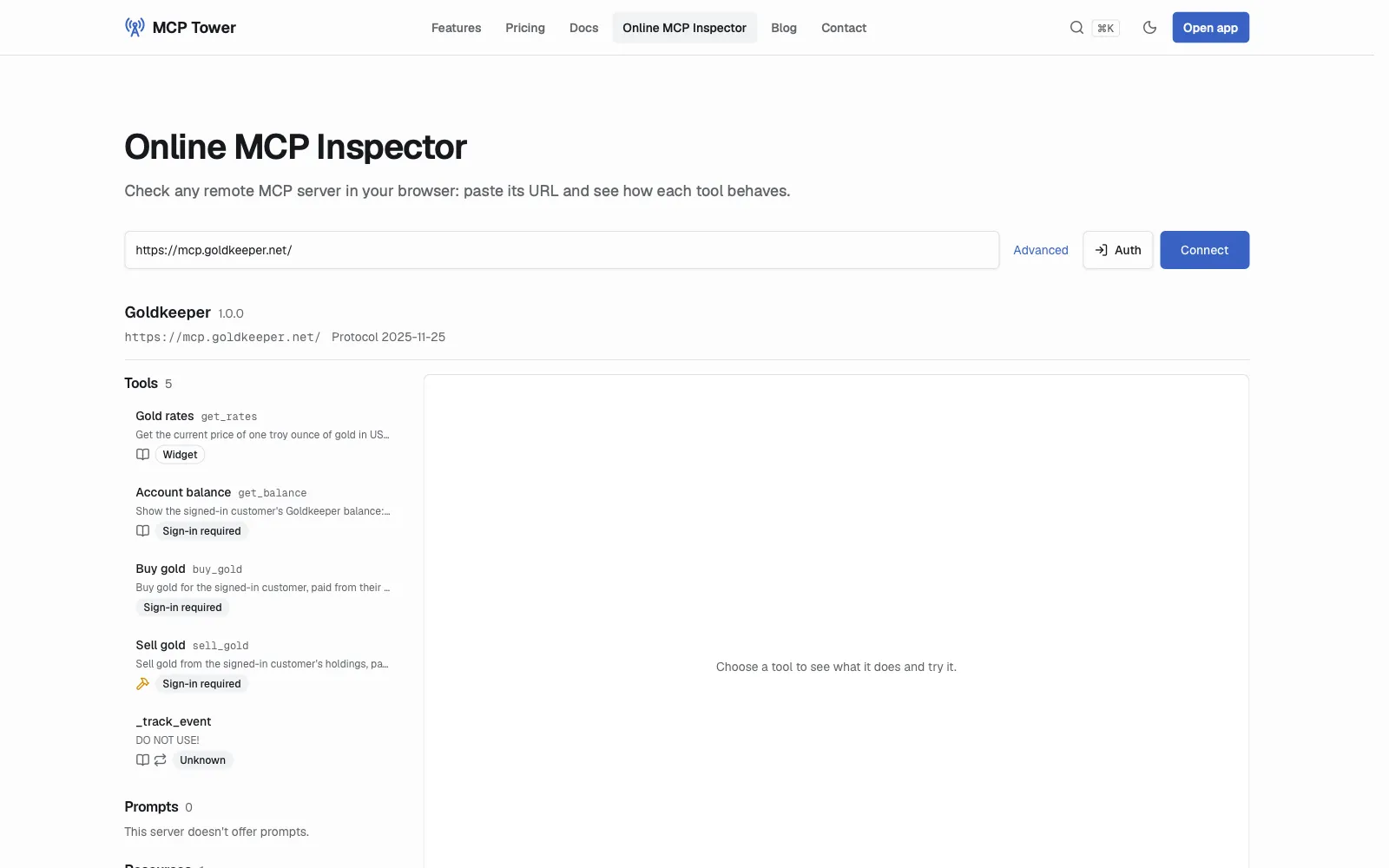
The first step of every audit: the server’s tools in the Online MCP Inspector.
The listing project
Section titled “The listing project”This is the agent channel’s version of a technical SEO project with a launch date. You run the submission process from lesson 4: the fact sheet, verification, test accounts and the tracker. Distribute in MCP Tower prepares each catalog’s answers from one questionnaire and keeps the status where every stakeholder can see it. The server’s owner submits under its own accounts, because catalogs ask the publisher to sign in and make attestations. Your work is the preparation, the review answers and the follow-up. Set the timeline honestly: some reviews take weeks.
The monthly rhythm
Section titled “The monthly rhythm”The monthly rhythm is where the report lives. Each month: build the slide, ship one experiment, watch for drift and outages, and pick the next listing. It is the same rhythm as monthly SEO work, with a smaller and newer channel, and with everyone reading the same page it takes hours, not days.
How to get stakeholders on board
Section titled “How to get stakeholders on board”- Open with a question: “When customers ask ChatGPT or Claude about what we sell, can the agent use our product?” Most teams do not know. The audit answers it.
- Be honest about size. The channel is small today and growing, and the agents are starting to suggest connectors on their own (lesson 1). An early listing compounds the way an early ranking does. Promise the work and the measurement, never a traffic figure.
- Give each stakeholder their view from day one: the engineer sees errors and uptime, the product owner sees which tools agents use, the marketing lead sees clicks back to the site. People who can see the numbers stop asking for them.
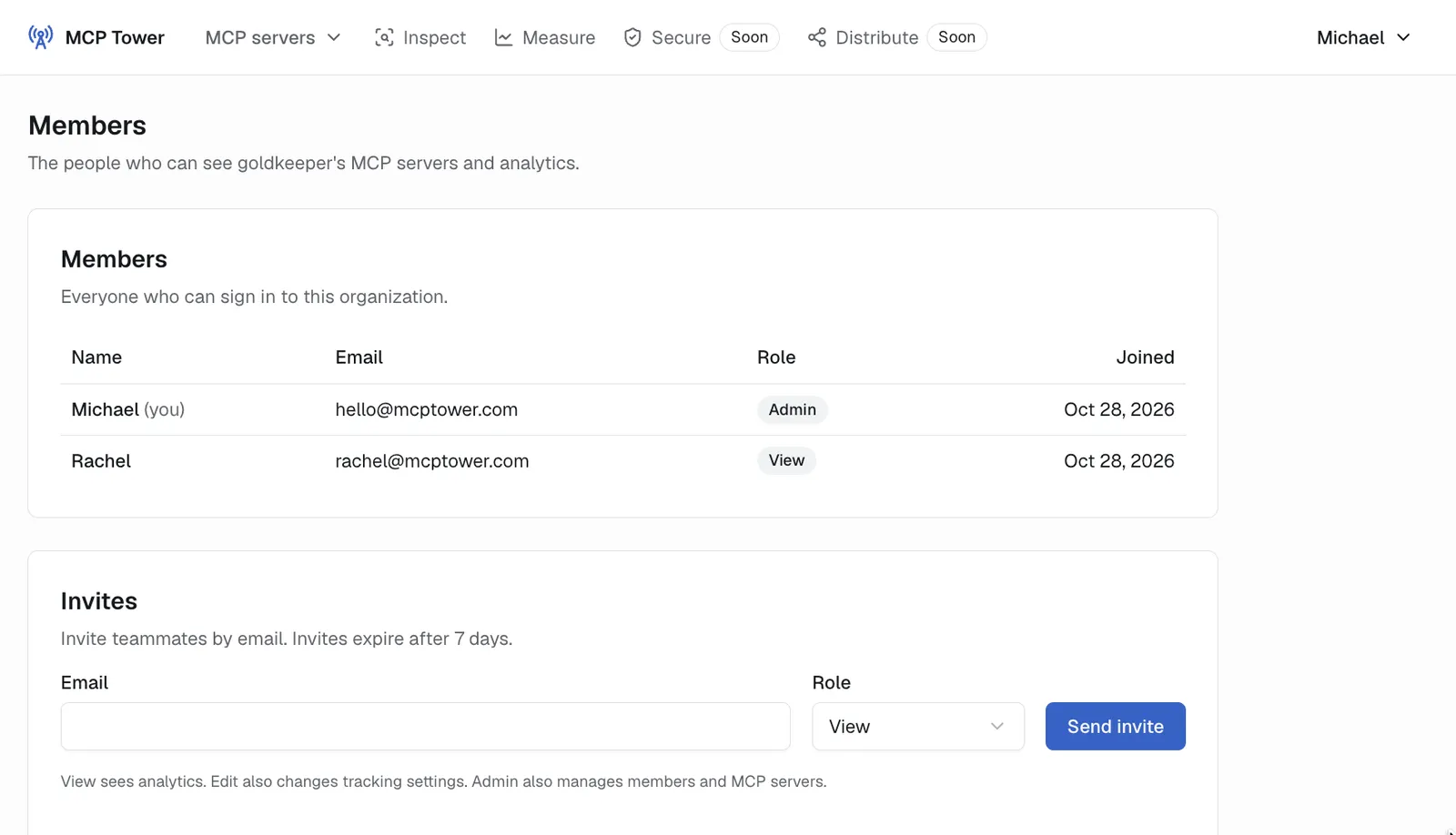
Members and roles in MCP Tower: View, Edit and Admin.
Your task
Section titled “Your task”This is the capstone: one MCP server listed, measured and reported in 30 days.
- Week 1, audit: run the audit on one real server with the table above. Send the engineer briefs from lessons 2, 4 and 7 for anything that has to be fixed.
- Week 2, listing: connect the server to MCP Tower, invite the stakeholders with the roles they need, answer the questionnaire in Distribute, publish to the official MCP Registry and submit to the catalogs that fit.
- Week 3, promotion: publish the “use us in ChatGPT” page, send the onboarding email and add one prompt (lesson 8).
- Week 4, report: build the one-slide report from the Measure page, with one recommendation for next month, and share it with every stakeholder. Practice first on Gold Keeper’s numbers from lesson 5.
- Plan the rhythm: write the three workstreams as a one-page plan, with an owner and a date for each.
- Start the account. MCP Tower costs just $79/mo, billed annually, with 100,000 tool calls a month included. Every server has a 30-day money-back guarantee on its first payment. Sign up for MCP Tower.
Go deeper
Section titled “Go deeper”- Pricing: plans, usage and the founding-customer price.
- Getting started: connect a server to MCP Tower.
- OAuth checks: the sign-in part of the audit.
- Online MCP Inspector: the free half of the audit.
Congratulations on completing the course
Section titled “Congratulations on completing the course”You made it through all nine lessons. You can now explain MCP in SEO terms, get a server into the directories, measure what agents and people do with it, and grow that usage one tested change at a time. That is a skill set very few marketers have yet, in a channel that is only getting started.
Mark this lesson as done below, then put it to work: run the capstone on a real server, and share the course with a colleague who keeps asking “what about AI?”.