MeasureLesson 6 of 9
ChatGPT traffic in GA4: widgets and links
You probably already know how to segment ChatGPT or Claude traffic in GA4 by utm_source or
referral domain. That covers citations: links the assistant found by searching the web and added
to its answer as sources. But what about links produced by your MCP tools or included in your widgets?
Those come from your own server, not from a web search, and they carry no tracking by default,
so they usually land in GA4 as Direct. GA4 cannot tell you the MCP server sent that visitor. This lesson
separates the two kinds of links, then shows how to measure what happens inside the answer: whether widgets
load, what people click in them, and which links in tool results they open, joined back to the tool call
and the agent that produced them. That lets you follow the chain from “the agent called us” to “a person
reached the website”.
Two kinds of ChatGPT traffic
Section titled “Two kinds of ChatGPT traffic”A web citation: utm_source=chatgpt.com
Section titled “A web citation: utm_source=chatgpt.com”When ChatGPT searches the web and cites a page, it adds utm_source=chatgpt.com to the link
(OpenAI’s publisher FAQ).
That visit has nothing to do with MCP: it is the GEO side of the channel, where the site is a
source in an answer. In GA4, open Reports → Acquisition → Traffic acquisition and look at
Session source / medium: chatgpt.com shows up as a source. Which default channel it falls
into depends on the medium GA4 sees with it, so filter by source rather than by channel.
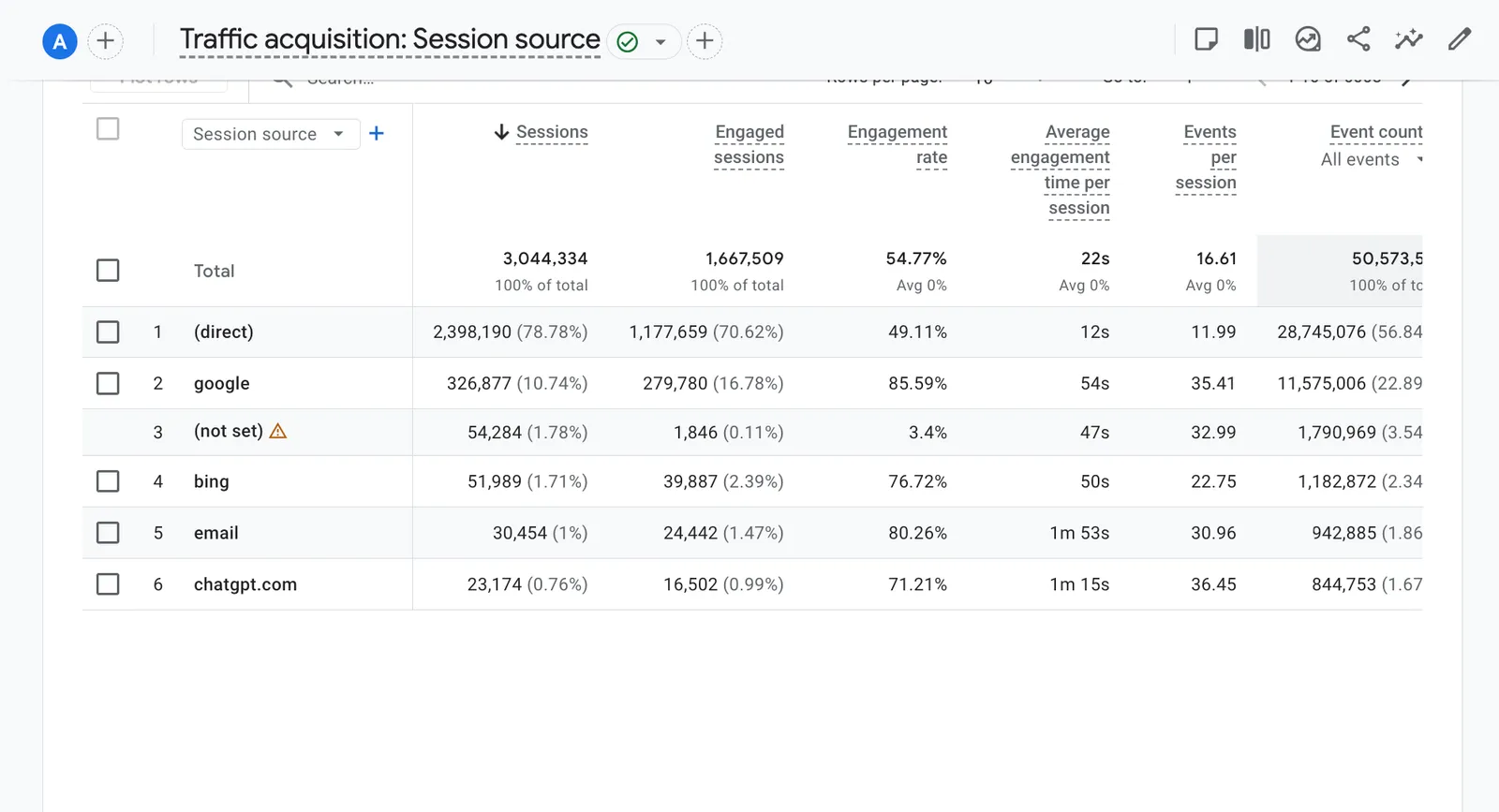
GA4 by session source: chatgpt.com appears as a source when ChatGPT cites a page.
A link from your MCP server: Direct
Section titled “A link from your MCP server: Direct”Now take your own MCP server. A user asks ChatGPT to book a demo, the agent calls a tool, and the tool returns a link to the company’s site. ChatGPT shows the link in its answer or inside a widget. The user clicks.
That link is whatever the server returned. ChatGPT does not tag it, and the server usually does not tag it, so it carries no UTM parameters. Clicks from inside a chat app often send no referrer either. GA4 gets a visit with no source and files it under Direct, next to bookmarks and typed URLs. Your MCP traffic is in that report, mixed in with everything else that arrived without a source.
If stakeholders want these visits visible in GA4, the server’s links need UTM parameters of their
own, for example utm_medium=mcp with a source that names the server. That is a change for the engineers,
and it only covers the click. It still does not tell you which tool or which agent produced the
link.
Tag the links the server returns
Section titled “Tag the links the server returns”The cheapest fix is the one you already know from email and paid campaigns: UTM parameters. Agree on a scheme with the engineers and have the server add it to every link a tool returns:
| Parameter | Value | Example |
|---|---|---|
utm_source | The assistant, when the server can tell, otherwise mcp | chatgpt, claude, mcp |
utm_medium | Always the same value, so one filter finds all of it | mcp |
utm_campaign | The server’s name | goldkeeper |
utm_content | The tool, and whether the link was in text or a widget | buy_gold-widget |
Many MCP clients name themselves when they connect, so the server can often fill utm_source. Treat
that name as a hint, not proof (lesson 5 explains why). Then, in GA4, add a custom channel group
with a channel such as “AI assistants (MCP)” for utm_medium exactly mcp, so these visits stop
hiding in Direct and get their own row next to Organic Search.
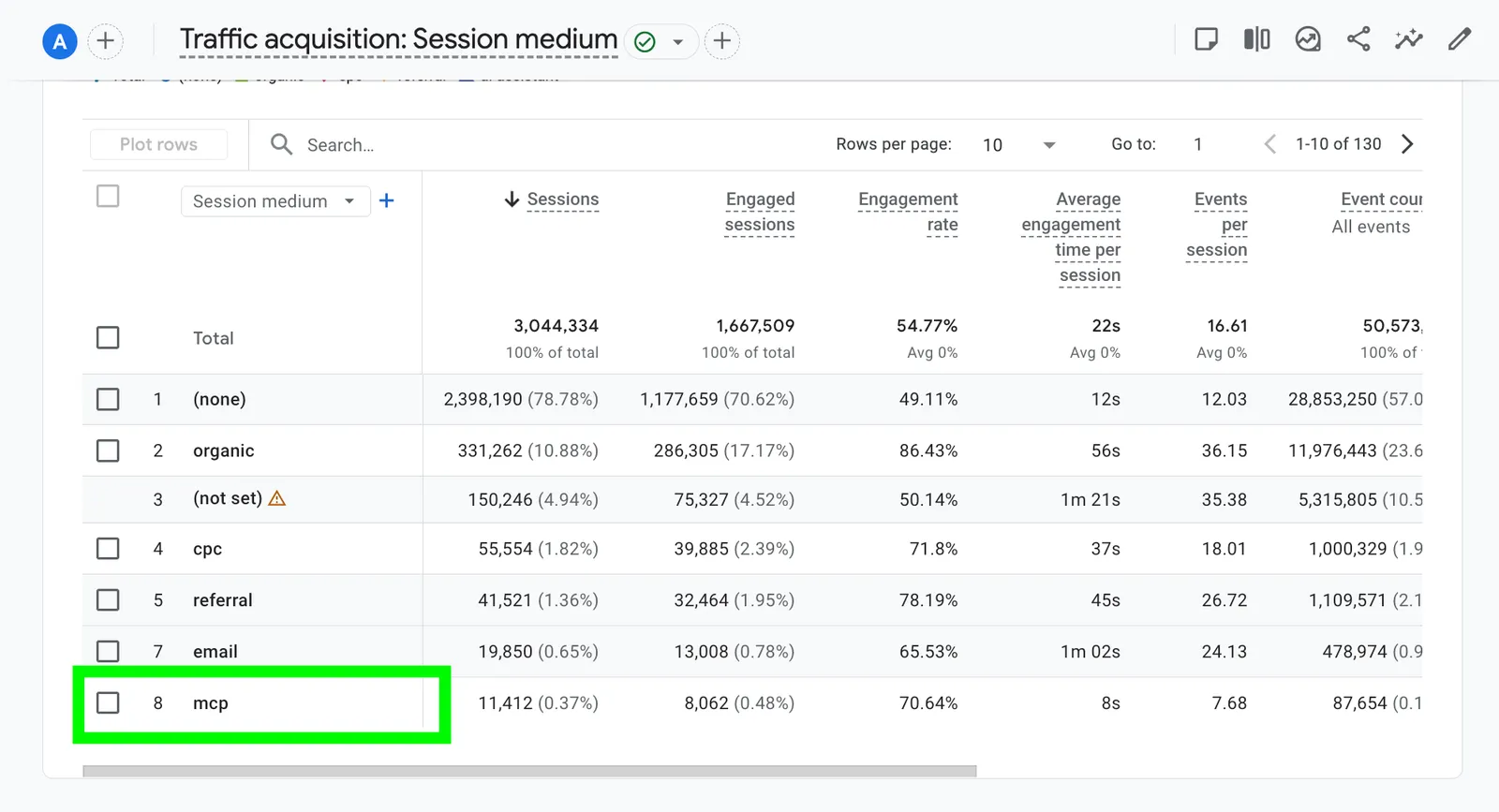
With utm_medium=mcp on the links, MCP visits get their own row instead of hiding in Direct.
UTMs tell you that a visit came from the MCP server and which tool produced the link. They do not
tell you how many links were shown and never opened, which is the click-through rate from lesson 5.
For that, the server has to count the links it returns. The usual way is a redirect: the tool
returns a short link on the company’s own domain (/go/…), the redirect logs the click with the
tool call it belongs to, then sends the person on to the real page, UTMs included. Two habits keep
the numbers honest:
- Filter out machines. Assistants and crawlers often fetch a link to preview it before, or instead of, a person opening it. Count only clicks that look like a person’s browser, the same habit as excluding bots in GA4.
- Keep the link stable. Directories review what the tools return. Use the same redirect domain from the first submission, so a later tracking change does not change what reviewers saw.
Widgets: the rich results of the agent channel
Section titled “Widgets: the rich results of the agent channel”A widget is a small interface the host draws inside the answer, as you saw with Gold Keeper’s rates card in lesson 2. For the business, it is the difference between a plain blue link and a rich result: more room, buttons, a reason to act. It also leaves no trace in GA4, because it runs inside ChatGPT or Claude, not on the company’s site.
A widget is a small web page, so it can report what happens in it, with two limits. It runs in a sandbox that blocks scripts and requests to domains the server did not declare, so a standard GA4 tag usually cannot load. And the user is not on the company’s site, so there is no session to join.
The chain from tool call to website visit
Section titled “The chain from tool call to website visit”Put the pieces together and one visit reads as a chain:
- An agent calls a tool (the server’s logs, by agent).
- The tool’s widget loads in the answer (the widget’s “loaded” event).
- The person clicks a button in the widget (the widget’s click event).
- The widget calls another tool, which returns a link (the server’s logs, and the link count).
- The person opens the link and reaches the website (the redirect log, then GA4 under the MCP channel).
GA4 sees only the last step, and only if the link was tagged. The server’s logs, the widget events and the redirect see the steps before it and which agent the chain came from. In a stakeholder report, the honest framing is “GA4 shows the visits; the server’s own data shows which of them the MCP server produced, and how many chances it had”.
Brief for the engineer
We want to measure what the MCP server sends people to. Could you:
- Tag every link a tool returns with
utm_medium=mcp,utm_sourceset to the client name from the MCPinitializerequest (ormcpwhen it is missing),utm_campaignset to the server’s name andutm_contentto the tool name, plus-widgetfor links shown in a widget. - Route those links through a redirect on our domain that logs the tool call id, the time and
the user agent, then answers
302to the tagged URL. Mark obvious bots and link previews. - Report widget events (loaded, button clicks with the button’s text, link opens) to an endpoint on our domain, and add that domain to the widget’s allowed connect domains (ChatGPT’s widget CSP, the MCP Apps resource’s CSP).
- Log every tool call with the tool, the client name, the result and whether it came from a widget, so we can join the steps.
Your task
Section titled “Your task”Gold Keeper is a dummy MCP server, safe to experiment with: the prices are demo prices, nothing is traded, no money moves and it never asks for payment details.
Make the click yourself, in your own ChatGPT or Claude with Gold Keeper added as in lesson 2.
- Ask for gold rates. The agent calls
get_ratesand draws the rates widget. - Pick an amount and press Buy on one row. The widget calls
buy_gold; sign in to Gold Keeper if asked. - Open the View receipt link the widget shows after the purchase. Look at the address you land on: does it carry UTM parameters, or did it pass through a redirect?
- For each step (the
get_ratescall, the widget load, the click on Buy, thebuy_goldcall, the receipt visit), write down what would record it and who owns that data. - Open your GA4 property and go to Traffic acquisition. Find
chatgpt.comas a session source. Then look for visits from links your own MCP server returned, and write down why you cannot separate them yet. - Write the tracking plan: the UTM scheme, whether to use a redirect, the widget events to report and the GA4 channel to create. The brief above is a starting point.
Check yourself
Section titled “Check yourself”Why does a citation in ChatGPT show up in GA4 when a link from your MCP server does not?
ChatGPT adds utm_source=chatgpt.com to the pages it cites in web answers. A link returned by
your MCP server is whatever the server put in its result, usually with no UTM parameters and
often no referrer, so GA4 counts the visit as Direct.
The engineers add UTM parameters to every link. What can GA4 still not tell you?
How many links were shown and never opened, so there is no click-through rate, and anything that happened before the click: which tool calls and widget views led to it. That needs the server’s own data: the tool call logs, a redirect that counts links, and widget events.
A tool returns a widget on 1,000 calls. Why check whether widgets loaded before reading clicks?
Because a host can receive a widget and never draw it. Comparing calls with “loaded” events shows how many people actually saw the widget. A low click rate on widgets nobody saw means a rendering problem, not a weak call to action.
Go deeper
Section titled “Go deeper”- OpenAI’s Publishers and developers FAQ,
on
utm_source=chatgpt.com - The MCP Apps extension, for how widgets are declared
- Google’s GA4 custom channel groups and Measurement Protocol
- Lesson 5, for the usage metrics that come before the click